<?xml version="1.0" encoding="utf-8"?>
<feed xmlns="http://www.w3.org/2005/Atom">
  <generator uri="https://jekyllrb.com/" version="4.4.1">Jekyll</generator>
  <link href="https://www.klioba.com/feed-postgresql.xml" rel="self" type="application/atom+xml"/>
  <link href="https://www.klioba.com/" rel="alternate" type="text/html"/>
  <updated>2026-04-21T19:28:56+00:00</updated>
  <id>https://www.klioba.com/feed-postgresql.xml</id>
  <title type="html">Taras Kloba - PostgreSQL</title>
  <subtitle>PostgreSQL articles by Taras Kloba</subtitle>
  <author>
    <name>Taras Kloba</name>
    <email>blog@klioba.com</email>
  </author>
  
  
  <entry>
    <title type="html">PostgreSQL as a Graph Database: Who Grabbed a Beer Together?</title>
    <link href="https://www.klioba.com/postgresql-as-a-graph-database" rel="alternate" type="text/html" title="PostgreSQL as a Graph Database: Who Grabbed a Beer Together?"/>
    <published>2025-12-27T00:00:00+00:00</published>
    <updated>2025-12-27T00:00:00+00:00</updated>
    <id>https://www.klioba.com/postgresql-as-a-graph-database</id>
    <content type="html" xml:base="https://www.klioba.com/postgresql-as-a-graph-database"><![CDATA[<p>Graph databases have become increasingly popular for modeling complex
relationships in data. But what if you could leverage graph capabilities
within the familiar PostgreSQL environment you already know and love?
In this article, I’ll explore how PostgreSQL can serve as a graph
database using the Apache AGE extension, demonstrated through a fun
use case: analyzing social connections in the craft beer community
using Untappd data.</p>

<p><em>This article is based on my <a href="https://www.postgresql.eu/events/pgconfeu2025/schedule/session/7016-postgresql-as-a-graph-database-who-grabbed-a-beer-together/">presentation at PgConf.EU 2025</a> in Riga, Latvia.
Special thanks to <a href="https://github.com/pashagolub">Pavlo Golub</a>, my
co-founder of the PostgreSQL Ukraine community, whose Untappd account
served as the perfect example for this demonstration.</em></p>

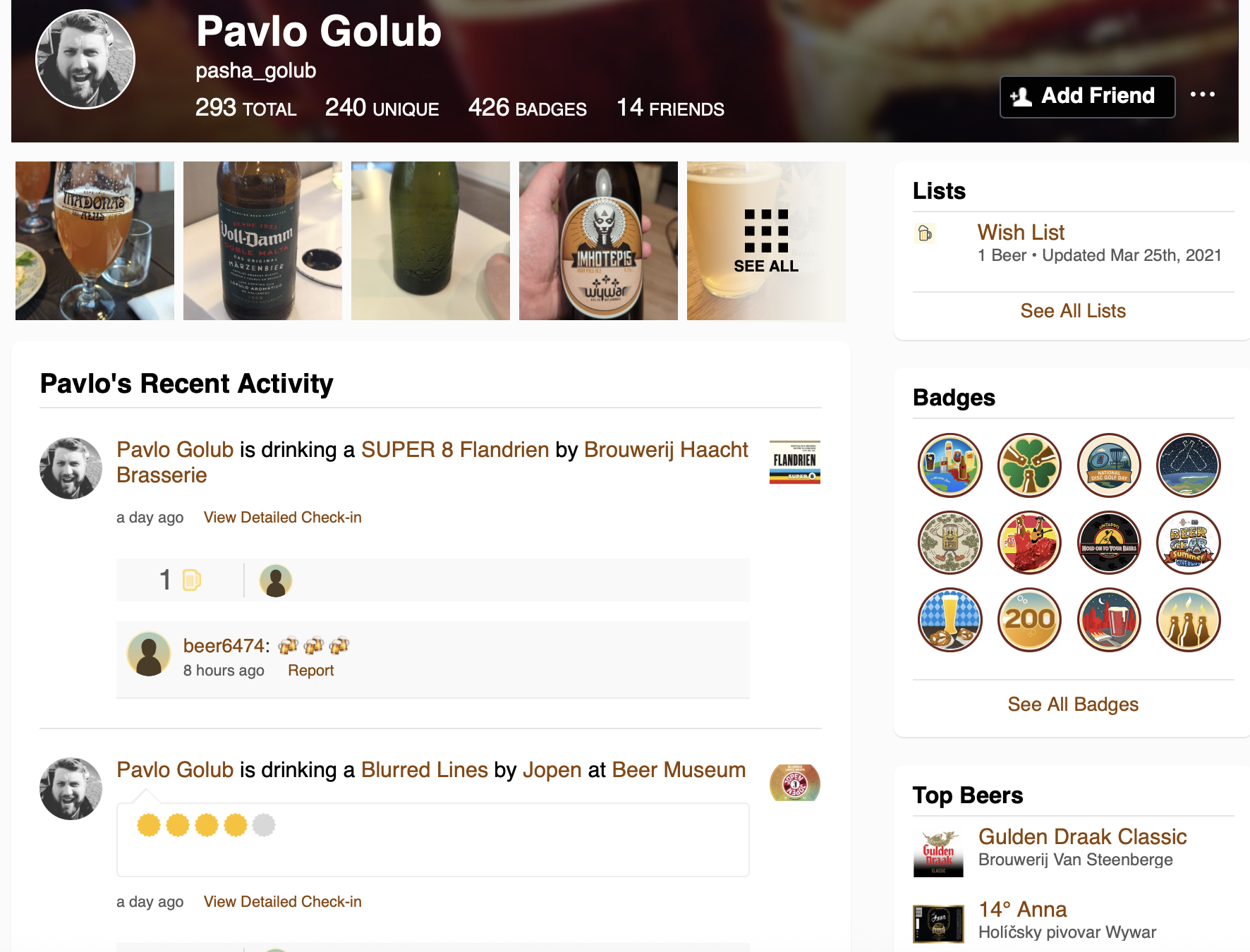
<p><img src="/imgs/postgresql-graph/untappd-profile.png" alt="Pavlo Golub's Untappd Profile" />
<em>Pavlo Golub’s Untappd profile - the starting point for our graph analysis</em></p>

<h2 id="why-graph-databases">Why Graph Databases?</h2>

<p>Traditional relational databases excel at storing structured data in
tables, but they can struggle when dealing with highly interconnected
data. Consider a social network where you want to find the shortest
path between two users through their mutual connections—this requires
recursive queries with CTEs, joining multiple tables, and becomes
increasingly complex as the depth of relationships grows.</p>

<p>You might say: “But I can do this with relational tables!” And yes,
you would be right in some cases. But graphs offer a different approach
that makes certain operations much more intuitive and efficient.</p>

<p>Graph databases model data as nodes (vertices) and edges (relationships),
making them ideal for:</p>

<ul>
  <li>Social networks</li>
  <li>Recommendation engines</li>
  <li>Fraud detection</li>
  <li>Knowledge graphs</li>
  <li>Network topology analysis</li>
</ul>

<h2 id="basic-terms-in-graph-theory">Basic Terms in Graph Theory</h2>

<p>Before diving into implementation, let’s establish some fundamental
concepts:</p>

<p><strong><a href="https://en.wikipedia.org/wiki/Vertex_(graph_theory)">Vertices (Nodes)</a></strong> are the fundamental units or points in a graph.
You can think of them like tables in relational databases. They
represent entities, objects, or data items—for example, individuals
in a social network.</p>

<p><strong><a href="https://en.wikipedia.org/wiki/Glossary_of_graph_theory#edge">Edges (Links/Relationships)</a></strong> are the connections between nodes that
indicate relationships. These are the links between your vertices.
They can be directed or undirected and may have weights or properties.</p>

<p><strong><a href="https://en.wikipedia.org/wiki/Graph_(discrete_mathematics)">Graph</a></strong> is a collection of vertices and edges forming a structure.
When you bring vertices and edges together, they create your graph.</p>

<p><strong><a href="https://en.wikipedia.org/wiki/Path_(graph_theory)">Path</a></strong> is a sequence of edges connecting two nodes. If you want to
connect some vertices and need to pass through multiple nodes, this
becomes your path.</p>

<p><strong><a href="https://en.wikipedia.org/wiki/Degree_(graph_theory)">Degree</a></strong> is the number of edges connected to a node. Your node can
have different connections, and the count of these connections describes
its degree.</p>

<h2 id="the-untappd-use-case">The Untappd Use Case</h2>

<p>When you want to demonstrate something, you need real data.
<a href="https://untappd.com/">Untappd</a> is a social networking platform for
craft beer enthusiasts that provides a perfect example. Users can check
in beers they’re drinking, rate them, add photos, and interact with
friends.</p>

<p>The platform exposes rich social data through user profiles and activity
feeds, including:</p>

<ul>
  <li>Full name and username</li>
  <li>Friends list</li>
  <li>Check-ins with beer, brewery, venue, rating, timestamp</li>
  <li>Comments on check-ins</li>
  <li>Toasts (likes) on check-ins</li>
  <li>Photos shared</li>
</ul>

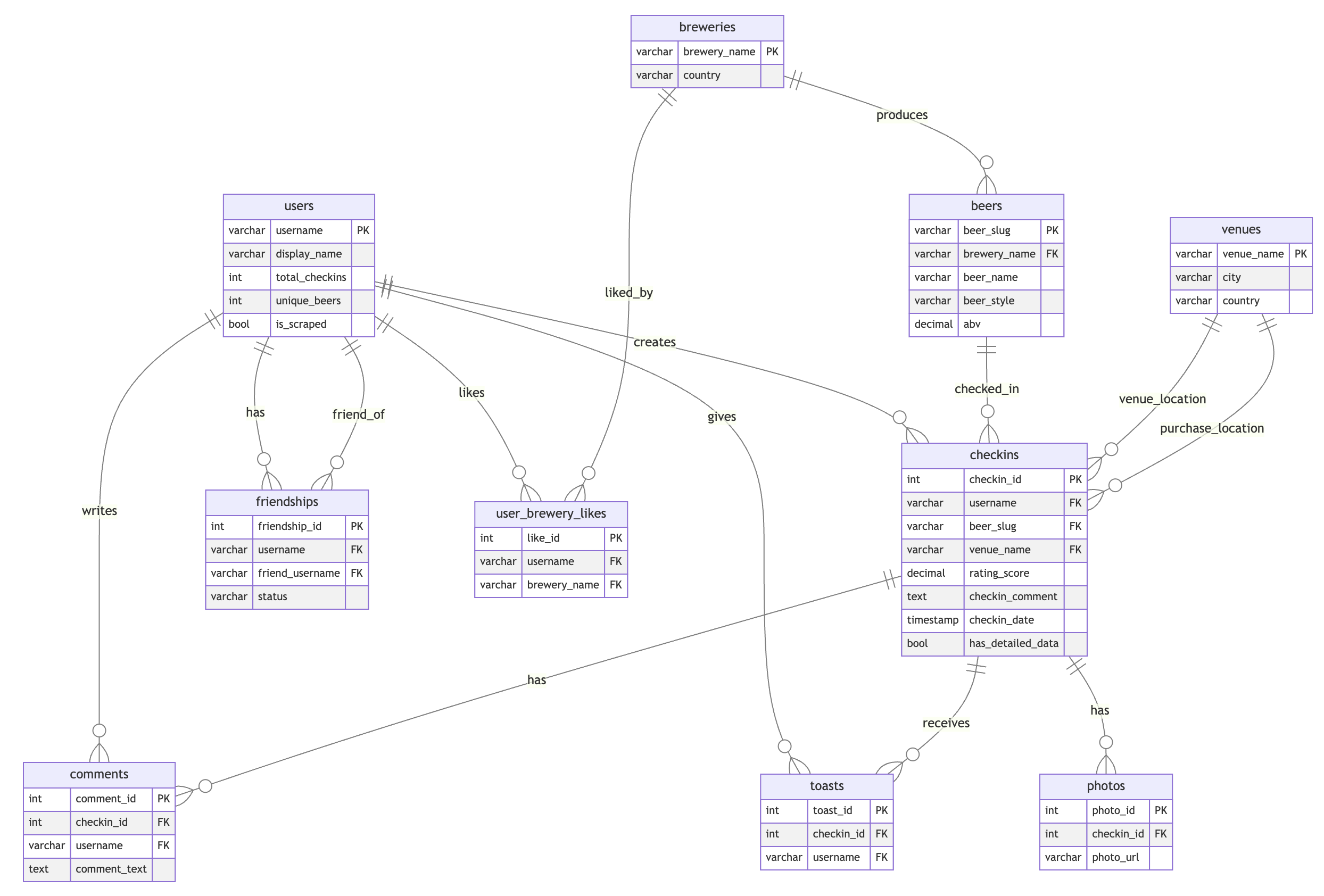
<p>In a traditional relational approach, this data would be modeled with
separate tables connected by foreign keys:</p>

<p><img src="/imgs/postgresql-graph/erd-schema.png" alt="ERD Schema - Relational Model" />
<em>Traditional relational schema for Untappd data</em></p>

<p>This data naturally forms a graph where we might want to answer questions
like: <em>“What’s the shortest path between two users?”</em> or <em>“Who grabbed
a beer together?”</em></p>

<h2 id="the-graph-model">The Graph Model</h2>

<p>Instead of the relational model with separate tables for users, breweries,
beers, venues, and check-ins with foreign key relationships, we can
model the same data as a graph:</p>

<p><strong>Node Types:</strong></p>

<div class="language-plaintext highlighter-rouge"><div class="highlight"><pre class="highlight"><code>User (username)
Checkin (checkin_id, rating, serving_style, comment, date, photos)
Beer (beer_slug)
Brewery (brewery_name)
Venue (venue_name)
</code></pre></div></div>

<p><strong>Relationships (Edges):</strong></p>

<div class="language-plaintext highlighter-rouge"><div class="highlight"><pre class="highlight"><code>User -[FRIEND_OF {status}]-&gt; User
User -[CHECKED_IN]-&gt; Checkin
User -[TOASTED]-&gt; Checkin
User -[COMMENTED {text, timestamp}]-&gt; Checkin
User -[WISHLIST]-&gt; Beer
User -[LIKES_BREWERY]-&gt; Brewery
Checkin -[FOR_BEER]-&gt; Beer
Checkin -[AT_VENUE]-&gt; Venue
Checkin -[PURCHASED_AT]-&gt; Venue
Beer -[BREWED_BY]-&gt; Brewery
</code></pre></div></div>

<p><img src="/imgs/postgresql-graph/graph-model.png" alt="Graph Model" />
<em>Graph model showing nodes and relationships in the Untappd data</em></p>

<p>Here’s how you would create this graph model in Apache AGE using Cypher:</p>

<div class="language-sql highlighter-rouge"><div class="highlight"><pre class="highlight"><code><span class="c1">-- Create the graph</span>
<span class="k">SELECT</span> <span class="n">create_graph</span><span class="p">(</span><span class="s1">'untappd_graph'</span><span class="p">);</span>

<span class="c1">-- Create nodes</span>
<span class="k">SELECT</span> <span class="o">*</span> <span class="k">FROM</span> <span class="n">cypher</span><span class="p">(</span><span class="s1">'untappd_graph'</span><span class="p">,</span> <span class="err">$$</span>
  <span class="k">CREATE</span> <span class="p">(</span><span class="n">u</span><span class="p">:</span><span class="k">User</span> <span class="p">{</span><span class="n">username</span><span class="p">:</span> <span class="s1">'taras'</span><span class="p">,</span> <span class="n">name</span><span class="p">:</span> <span class="s1">'Taras Kloba'</span><span class="p">})</span>
  <span class="k">CREATE</span> <span class="p">(</span><span class="n">b</span><span class="p">:</span><span class="n">Beer</span> <span class="p">{</span><span class="n">beer_slug</span><span class="p">:</span> <span class="s1">'guinness-draught'</span><span class="p">,</span> <span class="n">name</span><span class="p">:</span> <span class="s1">'Guinness Draught'</span><span class="p">})</span>
  <span class="k">CREATE</span> <span class="p">(</span><span class="n">br</span><span class="p">:</span><span class="n">Brewery</span> <span class="p">{</span><span class="n">brewery_name</span><span class="p">:</span> <span class="s1">'guinness'</span><span class="p">,</span> <span class="n">name</span><span class="p">:</span> <span class="s1">'Guinness'</span><span class="p">})</span>
  <span class="k">CREATE</span> <span class="p">(</span><span class="n">v</span><span class="p">:</span><span class="n">Venue</span> <span class="p">{</span><span class="n">venue_name</span><span class="p">:</span> <span class="s1">'irish-pub-kyiv'</span><span class="p">,</span> <span class="n">name</span><span class="p">:</span> <span class="s1">'Irish Pub Kyiv'</span><span class="p">})</span>
  <span class="k">CREATE</span> <span class="p">(</span><span class="k">c</span><span class="p">:</span><span class="n">Checkin</span> <span class="p">{</span><span class="n">checkin_id</span><span class="p">:</span> <span class="mi">1</span><span class="p">,</span> <span class="n">rating</span><span class="p">:</span> <span class="mi">4</span><span class="p">.</span><span class="mi">5</span><span class="p">,</span> <span class="nb">date</span><span class="p">:</span> <span class="s1">'2024-12-27'</span><span class="p">})</span>
<span class="err">$$</span><span class="p">)</span> <span class="k">AS</span> <span class="p">(</span><span class="k">result</span> <span class="n">agtype</span><span class="p">);</span>

<span class="c1">-- Create relationships</span>
<span class="k">SELECT</span> <span class="o">*</span> <span class="k">FROM</span> <span class="n">cypher</span><span class="p">(</span><span class="s1">'untappd_graph'</span><span class="p">,</span> <span class="err">$$</span>
  <span class="k">MATCH</span> <span class="p">(</span><span class="n">u</span><span class="p">:</span><span class="k">User</span> <span class="p">{</span><span class="n">username</span><span class="p">:</span> <span class="s1">'taras'</span><span class="p">}),</span> <span class="p">(</span><span class="k">c</span><span class="p">:</span><span class="n">Checkin</span> <span class="p">{</span><span class="n">checkin_id</span><span class="p">:</span> <span class="mi">1</span><span class="p">})</span>
  <span class="k">CREATE</span> <span class="p">(</span><span class="n">u</span><span class="p">)</span><span class="o">-</span><span class="p">[:</span><span class="n">CHECKED_IN</span><span class="p">]</span><span class="o">-&gt;</span><span class="p">(</span><span class="k">c</span><span class="p">)</span>
<span class="err">$$</span><span class="p">)</span> <span class="k">AS</span> <span class="p">(</span><span class="k">result</span> <span class="n">agtype</span><span class="p">);</span>

<span class="k">SELECT</span> <span class="o">*</span> <span class="k">FROM</span> <span class="n">cypher</span><span class="p">(</span><span class="s1">'untappd_graph'</span><span class="p">,</span> <span class="err">$$</span>
  <span class="k">MATCH</span> <span class="p">(</span><span class="k">c</span><span class="p">:</span><span class="n">Checkin</span> <span class="p">{</span><span class="n">checkin_id</span><span class="p">:</span> <span class="mi">1</span><span class="p">}),</span> <span class="p">(</span><span class="n">b</span><span class="p">:</span><span class="n">Beer</span> <span class="p">{</span><span class="n">beer_slug</span><span class="p">:</span> <span class="s1">'guinness-draught'</span><span class="p">})</span>
  <span class="k">CREATE</span> <span class="p">(</span><span class="k">c</span><span class="p">)</span><span class="o">-</span><span class="p">[:</span><span class="n">FOR_BEER</span><span class="p">]</span><span class="o">-&gt;</span><span class="p">(</span><span class="n">b</span><span class="p">)</span>
<span class="err">$$</span><span class="p">)</span> <span class="k">AS</span> <span class="p">(</span><span class="k">result</span> <span class="n">agtype</span><span class="p">);</span>

<span class="k">SELECT</span> <span class="o">*</span> <span class="k">FROM</span> <span class="n">cypher</span><span class="p">(</span><span class="s1">'untappd_graph'</span><span class="p">,</span> <span class="err">$$</span>
  <span class="k">MATCH</span> <span class="p">(</span><span class="k">c</span><span class="p">:</span><span class="n">Checkin</span> <span class="p">{</span><span class="n">checkin_id</span><span class="p">:</span> <span class="mi">1</span><span class="p">}),</span> <span class="p">(</span><span class="n">v</span><span class="p">:</span><span class="n">Venue</span> <span class="p">{</span><span class="n">venue_name</span><span class="p">:</span> <span class="s1">'irish-pub-kyiv'</span><span class="p">})</span>
  <span class="k">CREATE</span> <span class="p">(</span><span class="k">c</span><span class="p">)</span><span class="o">-</span><span class="p">[:</span><span class="n">AT_VENUE</span><span class="p">]</span><span class="o">-&gt;</span><span class="p">(</span><span class="n">v</span><span class="p">)</span>
<span class="err">$$</span><span class="p">)</span> <span class="k">AS</span> <span class="p">(</span><span class="k">result</span> <span class="n">agtype</span><span class="p">);</span>

<span class="k">SELECT</span> <span class="o">*</span> <span class="k">FROM</span> <span class="n">cypher</span><span class="p">(</span><span class="s1">'untappd_graph'</span><span class="p">,</span> <span class="err">$$</span>
  <span class="k">MATCH</span> <span class="p">(</span><span class="n">b</span><span class="p">:</span><span class="n">Beer</span> <span class="p">{</span><span class="n">beer_slug</span><span class="p">:</span> <span class="s1">'guinness-draught'</span><span class="p">}),</span> <span class="p">(</span><span class="n">br</span><span class="p">:</span><span class="n">Brewery</span> <span class="p">{</span><span class="n">brewery_name</span><span class="p">:</span> <span class="s1">'guinness'</span><span class="p">})</span>
  <span class="k">CREATE</span> <span class="p">(</span><span class="n">b</span><span class="p">)</span><span class="o">-</span><span class="p">[:</span><span class="n">BREWED_BY</span><span class="p">]</span><span class="o">-&gt;</span><span class="p">(</span><span class="n">br</span><span class="p">)</span>
<span class="err">$$</span><span class="p">)</span> <span class="k">AS</span> <span class="p">(</span><span class="k">result</span> <span class="n">agtype</span><span class="p">);</span>
</code></pre></div></div>

<p>The visualization of this data becomes quite impressive when you can
navigate through thousands of connections and see relationships that
would be difficult to discover in tabular data.</p>

<div class="video-container">
<iframe width="560" height="315" src="https://www.youtube-nocookie.com/embed/LxEpyi0cYhI" title="Apache AGE Demo: Visualizing Graph Nodes and Edges in 3D" frameborder="0" allow="accelerometer; autoplay; clipboard-write; encrypted-media; gyroscope; picture-in-picture; web-share" referrerpolicy="strict-origin-when-cross-origin" allowfullscreen=""></iframe>
</div>

<h2 id="finding-paths-sql-vs-cypher">Finding Paths: SQL vs Cypher</h2>

<p>Imagine you want to find the closest path between two users. They can
have different interactions between them—comments, toasts (likes),
friendships, liking the same beer or brewery. There are many possible
ways to find connections between two users.</p>

<h3 id="the-sql-approach-recursive-cte">The SQL Approach (Recursive CTE)</h3>

<p>With regular SQL, this becomes quite challenging. You need recursive
queries with CTEs, going through all the relationship tables, finding
users in one table, trying to find connections to other users:</p>

<div class="language-sql highlighter-rouge"><div class="highlight"><pre class="highlight"><code><span class="k">WITH</span> <span class="k">RECURSIVE</span>
<span class="c1">-- Build a unified graph of all user connections</span>
<span class="n">user_connections</span> <span class="k">AS</span> <span class="p">(</span>
    <span class="c1">-- Direct friendships (bidirectional)</span>
    <span class="k">SELECT</span>   <span class="n">username</span> <span class="k">AS</span> <span class="n">user1</span><span class="p">,</span>
             <span class="n">friend_username</span> <span class="k">AS</span> <span class="n">user2</span><span class="p">,</span>
             <span class="s1">'friendship'</span> <span class="k">AS</span> <span class="n">connection_type</span><span class="p">,</span>
             <span class="mi">1</span> <span class="k">AS</span> <span class="n">weight</span>
    <span class="k">FROM</span>     <span class="n">friendships</span>
    <span class="k">WHERE</span>    <span class="n">status</span> <span class="o">=</span> <span class="s1">'active'</span>

    <span class="k">UNION</span> <span class="k">ALL</span>

    <span class="k">SELECT</span>   <span class="n">friend_username</span> <span class="k">AS</span> <span class="n">user1</span><span class="p">,</span>
             <span class="n">username</span> <span class="k">AS</span> <span class="n">user2</span><span class="p">,</span>
             <span class="s1">'friendship'</span> <span class="k">AS</span> <span class="n">connection_type</span><span class="p">,</span>
             <span class="mi">1</span> <span class="k">AS</span> <span class="n">weight</span>
    <span class="k">FROM</span>     <span class="n">friendships</span>
    <span class="k">WHERE</span>    <span class="n">status</span> <span class="o">=</span> <span class="s1">'active'</span>

    <span class="k">UNION</span> <span class="k">ALL</span>

    <span class="c1">-- Toast interactions</span>
    <span class="k">SELECT</span> <span class="k">DISTINCT</span>
             <span class="n">t</span><span class="p">.</span><span class="n">username</span> <span class="k">AS</span> <span class="n">user1</span><span class="p">,</span>
             <span class="k">c</span><span class="p">.</span><span class="n">username</span> <span class="k">AS</span> <span class="n">user2</span><span class="p">,</span>
             <span class="s1">'toast'</span> <span class="k">AS</span> <span class="n">connection_type</span><span class="p">,</span>
             <span class="mi">2</span> <span class="k">AS</span> <span class="n">weight</span>
    <span class="k">FROM</span>     <span class="n">toasts</span> <span class="n">t</span>
    <span class="k">JOIN</span>     <span class="n">checkins</span> <span class="k">c</span> <span class="k">ON</span> <span class="n">t</span><span class="p">.</span><span class="n">checkin_id</span> <span class="o">=</span> <span class="k">c</span><span class="p">.</span><span class="n">checkin_id</span>
    <span class="k">WHERE</span>    <span class="n">t</span><span class="p">.</span><span class="n">username</span> <span class="o">!=</span> <span class="k">c</span><span class="p">.</span><span class="n">username</span>
    <span class="c1">-- ... more connection types ...</span>
<span class="p">),</span>

<span class="c1">-- Aggregate connections to find strongest link between users</span>
<span class="n">aggregated_connections</span> <span class="k">AS</span> <span class="p">(</span>
    <span class="k">SELECT</span>   <span class="n">user1</span><span class="p">,</span>
             <span class="n">user2</span><span class="p">,</span>
             <span class="k">MIN</span><span class="p">(</span><span class="n">weight</span><span class="p">)</span> <span class="k">AS</span> <span class="n">min_weight</span><span class="p">,</span>
             <span class="n">array_agg</span><span class="p">(</span><span class="k">DISTINCT</span> <span class="n">connection_type</span><span class="p">)</span> <span class="k">AS</span> <span class="n">connection_types</span>
    <span class="k">FROM</span>     <span class="n">user_connections</span>
    <span class="k">GROUP</span> <span class="k">BY</span> <span class="n">user1</span><span class="p">,</span> <span class="n">user2</span>
<span class="p">),</span>

<span class="c1">-- Recursive pathfinding using BFS</span>
<span class="n">path_search</span> <span class="k">AS</span> <span class="p">(</span>
    <span class="c1">-- Base case: start from source user</span>
    <span class="k">SELECT</span>   <span class="p">:</span><span class="n">source_user</span><span class="p">::</span><span class="nb">VARCHAR</span> <span class="k">AS</span> <span class="k">current_user</span><span class="p">,</span>
             <span class="p">:</span><span class="n">source_user</span><span class="p">::</span><span class="nb">VARCHAR</span> <span class="k">AS</span> <span class="n">path_text</span><span class="p">,</span>
             <span class="n">ARRAY</span><span class="p">[:</span><span class="n">source_user</span><span class="p">::</span><span class="nb">VARCHAR</span><span class="p">]</span> <span class="k">AS</span> <span class="n">path_array</span><span class="p">,</span>
             <span class="mi">0</span> <span class="k">AS</span> <span class="n">total_weight</span><span class="p">,</span>
             <span class="mi">0</span> <span class="k">AS</span> <span class="n">hop_count</span>

    <span class="k">UNION</span> <span class="k">ALL</span>

    <span class="c1">-- Recursive case: explore neighbors</span>
    <span class="k">SELECT</span>   <span class="n">ac</span><span class="p">.</span><span class="n">user2</span><span class="p">,</span>
             <span class="n">ps</span><span class="p">.</span><span class="n">path_text</span> <span class="o">||</span> <span class="s1">' -&gt; '</span> <span class="o">||</span> <span class="n">ac</span><span class="p">.</span><span class="n">user2</span><span class="p">,</span>
             <span class="n">ps</span><span class="p">.</span><span class="n">path_array</span> <span class="o">||</span> <span class="n">ac</span><span class="p">.</span><span class="n">user2</span><span class="p">,</span>
             <span class="n">ps</span><span class="p">.</span><span class="n">total_weight</span> <span class="o">+</span> <span class="n">ac</span><span class="p">.</span><span class="n">min_weight</span><span class="p">,</span>
             <span class="n">ps</span><span class="p">.</span><span class="n">hop_count</span> <span class="o">+</span> <span class="mi">1</span>
    <span class="k">FROM</span>     <span class="n">path_search</span> <span class="n">ps</span>
    <span class="k">JOIN</span>     <span class="n">aggregated_connections</span> <span class="n">ac</span> <span class="k">ON</span> <span class="n">ps</span><span class="p">.</span><span class="k">current_user</span> <span class="o">=</span> <span class="n">ac</span><span class="p">.</span><span class="n">user1</span>
    <span class="k">WHERE</span>    <span class="k">NOT</span> <span class="p">(</span><span class="n">ac</span><span class="p">.</span><span class="n">user2</span> <span class="o">=</span> <span class="k">ANY</span><span class="p">(</span><span class="n">ps</span><span class="p">.</span><span class="n">path_array</span><span class="p">))</span>  <span class="c1">-- Avoid cycles</span>
      <span class="k">AND</span>    <span class="n">ps</span><span class="p">.</span><span class="n">hop_count</span> <span class="o">&lt;</span> <span class="mi">6</span>                      <span class="c1">-- Limit depth</span>
      <span class="k">AND</span>    <span class="n">ps</span><span class="p">.</span><span class="k">current_user</span> <span class="o">!=</span> <span class="p">:</span><span class="n">target_user</span>       <span class="c1">-- Stop at target</span>
<span class="p">)</span>

<span class="c1">-- Find shortest paths to target</span>
<span class="k">SELECT</span>   <span class="n">path_text</span><span class="p">,</span>
         <span class="n">total_weight</span><span class="p">,</span>
         <span class="n">hop_count</span> <span class="k">AS</span> <span class="n">degrees_of_separation</span>
<span class="k">FROM</span>     <span class="n">path_search</span>
<span class="k">WHERE</span>    <span class="k">current_user</span> <span class="o">=</span> <span class="p">:</span><span class="n">target_user</span>
<span class="k">ORDER</span> <span class="k">BY</span> <span class="n">total_weight</span><span class="p">,</span> <span class="n">hop_count</span>
<span class="k">LIMIT</span>    <span class="mi">10</span><span class="p">;</span>
</code></pre></div></div>

<p>This query is complex, verbose, and difficult to maintain.</p>

<h3 id="the-cypher-approach-apache-age">The Cypher Approach (Apache AGE)</h3>

<p>With Apache AGE and the openCypher syntax, the same query becomes
remarkably simple:</p>

<div class="language-sql highlighter-rouge"><div class="highlight"><pre class="highlight"><code><span class="k">SELECT</span> <span class="o">*</span>
<span class="k">FROM</span>   <span class="n">cypher</span><span class="p">(</span><span class="s1">'untappd_graph'</span><span class="p">,</span> <span class="err">$$</span>
           <span class="k">MATCH</span> <span class="n">path</span> <span class="o">=</span> <span class="p">(</span><span class="n">u1</span><span class="p">:</span><span class="k">User</span> <span class="p">{</span><span class="n">username</span><span class="p">:</span> <span class="s1">'user1'</span><span class="p">})</span><span class="o">-</span><span class="p">[</span><span class="o">*</span><span class="p">]</span><span class="o">-</span><span class="p">(</span><span class="n">u2</span><span class="p">:</span><span class="k">User</span> <span class="p">{</span><span class="n">username</span><span class="p">:</span> <span class="s1">'user2'</span><span class="p">})</span>
           <span class="k">RETURN</span> <span class="n">nodes</span><span class="p">(</span><span class="n">path</span><span class="p">)</span> <span class="k">AS</span> <span class="n">all_nodes</span><span class="p">,</span> <span class="k">length</span><span class="p">(</span><span class="n">path</span><span class="p">)</span> <span class="k">AS</span> <span class="n">hops</span>
       <span class="err">$$</span><span class="p">)</span> <span class="k">AS</span> <span class="p">(</span><span class="n">all_nodes</span> <span class="n">agtype</span><span class="p">,</span> <span class="n">hops</span> <span class="n">agtype</span><span class="p">)</span>
<span class="k">ORDER</span> <span class="k">BY</span> <span class="n">hops</span>
<span class="k">LIMIT</span>  <span class="mi">1</span><span class="p">;</span>
</code></pre></div></div>

<p>With this simple line, we identify all paths that can connect two users,
calculate the number of hops between them, and then—here’s the beauty
of combining SQL with openCypher—we can use familiar operators like
<code class="language-plaintext highlighter-rouge">ORDER BY</code> and <code class="language-plaintext highlighter-rouge">LIMIT</code> to get just the shortest path.</p>

<p>The pattern matching syntax <code class="language-plaintext highlighter-rouge">(u1:User)-[*]-(u2:User)</code> naturally expresses
“find any path between two users through any edges.”</p>

<div class="video-container">
<iframe width="560" height="315" src="https://www.youtube-nocookie.com/embed/wj9vp0HXK_M" title="Apache AGE Demo: Finding the Shortest Path Between Users" frameborder="0" allow="accelerometer; autoplay; clipboard-write; encrypted-media; gyroscope; picture-in-picture; web-share" referrerpolicy="strict-origin-when-cross-origin" allowfullscreen=""></iframe>
</div>

<h2 id="what-is-apache-age">What is Apache AGE?</h2>

<p>Apache AGE (A Graph Extension) brings native graph database capabilities
to PostgreSQL. What makes it special:</p>

<p><strong>openCypher Standard</strong>: This is the standard syntax for graph databases.
If you’ve worked with Neo4j, you’ll find the same syntax here. This is
wonderful because you can start working with one database but easily migrate
to PostgreSQL and continue your work with the functionality you already
know.</p>

<p><strong>Part of Apache Software Foundation</strong>: When a project is part of Apache,
you know they won’t suddenly stop development or abandon the project
without notice. It’s also about peer reviews and sharing best practices.</p>

<p><strong>Hybrid Querying</strong>: Seamlessly mix SQL and Cypher in the same query.
You can wrap your Cypher query in a function, and then apply all the
SQL operators you know—joins, limits, orders, aggregations—to the
graph output.</p>

<h2 id="how-age-stores-data-internally">How AGE Stores Data Internally</h2>

<p>One question that often comes up: how does AGE store graph data?</p>

<p>The answer is elegant: <strong>everything is stored in regular PostgreSQL
tables</strong>. For each vertex label, you get a table with two columns:</p>
<ul>
  <li><code class="language-plaintext highlighter-rouge">id</code>: A unique identifier (sequence)</li>
  <li><code class="language-plaintext highlighter-rouge">properties</code>: A JSONB column containing all the node properties</li>
</ul>

<p>For edges, you get a table with:</p>
<ul>
  <li><code class="language-plaintext highlighter-rouge">id</code>: Unique edge identifier</li>
  <li><code class="language-plaintext highlighter-rouge">start_id</code>: Reference to the source vertex</li>
  <li><code class="language-plaintext highlighter-rouge">end_id</code>: Reference to the target vertex</li>
  <li><code class="language-plaintext highlighter-rouge">properties</code>: JSONB column for edge properties</li>
</ul>

<p>This means you can query graph data with regular SQL if you prefer:</p>

<div class="language-sql highlighter-rouge"><div class="highlight"><pre class="highlight"><code><span class="c1">-- Query vertices with regular SQL</span>
<span class="k">SELECT</span> <span class="o">*</span> <span class="k">FROM</span> <span class="n">demo_graph</span><span class="p">.</span><span class="nv">"User"</span><span class="p">;</span>
</code></pre></div></div>

<p><strong>Result:</strong></p>

<table>
  <thead>
    <tr>
      <th>id</th>
      <th>properties</th>
    </tr>
  </thead>
  <tbody>
    <tr>
      <td>844424930131969</td>
      <td><code class="language-plaintext highlighter-rouge">{"city": "Lviv", "username": "Taras"}</code></td>
    </tr>
    <tr>
      <td>844424930131970</td>
      <td><code class="language-plaintext highlighter-rouge">{"city": "Kropyvnytskyi", "username": "Pavlo"}</code></td>
    </tr>
    <tr>
      <td>844424930131971</td>
      <td><code class="language-plaintext highlighter-rouge">{"city": "Stockholm", "username": "Magnus"}</code></td>
    </tr>
  </tbody>
</table>

<p>Similarly, you can query the edges table to see the relationships:</p>

<div class="language-sql highlighter-rouge"><div class="highlight"><pre class="highlight"><code><span class="c1">-- Query edges with regular SQL</span>
<span class="k">SELECT</span> <span class="o">*</span> <span class="k">FROM</span> <span class="n">demo_graph</span><span class="p">.</span><span class="nv">"FRIENDS"</span><span class="p">;</span>
</code></pre></div></div>

<p><strong>Result:</strong></p>

<table>
  <thead>
    <tr>
      <th>id</th>
      <th>start_id</th>
      <th>end_id</th>
      <th>properties</th>
    </tr>
  </thead>
  <tbody>
    <tr>
      <td>1125899906842625</td>
      <td>844424930131969</td>
      <td>844424930131970</td>
      <td><code class="language-plaintext highlighter-rouge">{"since": "2019-01-22"}</code></td>
    </tr>
    <tr>
      <td>1125899906842626</td>
      <td>844424930131970</td>
      <td>844424930131971</td>
      <td><code class="language-plaintext highlighter-rouge">{}</code></td>
    </tr>
  </tbody>
</table>

<h2 id="performance-optimization">Performance Optimization</h2>

<p>Because the data is stored in regular PostgreSQL tables, you can use all the performance techniques you already know:</p>
<ul>
  <li>Create indexes on the ID columns</li>
  <li>Use conditional indexes based on your query patterns</li>
  <li>Apply all standard PostgreSQL optimization techniques</li>
</ul>

<div class="language-sql highlighter-rouge"><div class="highlight"><pre class="highlight"><code><span class="c1">-- Create an index on vertex properties</span>
<span class="k">CREATE</span> <span class="k">INDEX</span> <span class="n">idx_user_username</span>
    <span class="k">ON</span> <span class="n">demo_graph</span><span class="p">.</span><span class="nv">"User"</span>
    <span class="k">USING</span> <span class="n">GIN</span> <span class="p">((</span><span class="n">properties</span> <span class="o">-&gt;</span> <span class="s1">'username'</span><span class="p">));</span>

<span class="c1">-- Create a conditional index for active friendships</span>
<span class="k">CREATE</span> <span class="k">INDEX</span> <span class="n">idx_friends_active</span>
    <span class="k">ON</span> <span class="n">demo_graph</span><span class="p">.</span><span class="nv">"FRIENDS"</span>
    <span class="k">USING</span> <span class="n">BTREE</span> <span class="p">(</span><span class="n">start_id</span><span class="p">,</span> <span class="n">end_id</span><span class="p">)</span>
    <span class="k">WHERE</span> <span class="p">(</span><span class="n">properties</span> <span class="o">-&gt;</span> <span class="s1">'status'</span><span class="p">)::</span><span class="nb">TEXT</span> <span class="o">=</span> <span class="s1">'"active"'</span><span class="p">;</span>
</code></pre></div></div>

<p>The query planner takes these indexes into account during optimization, just like with any other PostgreSQL query.</p>

<h2 id="apache-age-vs-pgrouting">Apache AGE vs pgRouting</h2>

<p>When considering graph capabilities in PostgreSQL, two main extensions
stand out:</p>

<table>
  <thead>
    <tr>
      <th>Feature</th>
      <th>Apache AGE</th>
      <th>pgRouting</th>
    </tr>
  </thead>
  <tbody>
    <tr>
      <td><strong>Primary Use Case</strong></td>
      <td>Property-graph querying</td>
      <td>Routing and network analysis on spatial data</td>
    </tr>
    <tr>
      <td><strong>Query Language</strong></td>
      <td>SQL + openCypher</td>
      <td>SQL functions</td>
    </tr>
    <tr>
      <td><strong>Data Model</strong></td>
      <td>Property graph over PostgreSQL tables</td>
      <td>Relational tables with spatial topology</td>
    </tr>
    <tr>
      <td><strong>Integration</strong></td>
      <td>Standard PG tooling; optional AGE Viewer</td>
      <td>GIS toolchain: PostGIS, osm2pgrouting</td>
    </tr>
    <tr>
      <td><strong>License</strong></td>
      <td>Apache-2.0</td>
      <td>GPL-2.0</td>
    </tr>
    <tr>
      <td><strong>Azure Availability</strong></td>
      <td>Yes, on Azure Database for PostgreSQL</td>
      <td>Yes, with PostGIS</td>
    </tr>
    <tr>
      <td><strong>Best For</strong></td>
      <td>Pattern matching, relationship queries</td>
      <td>Shortest paths, isochrones, vehicle routing</td>
    </tr>
  </tbody>
</table>

<p>If you’re doing geoanalytics and have routing data, that’s also a kind
of graph data, and pgRouting with PostGIS is excellent for that use case.
But for general property-graph queries with openCypher syntax, Apache
AGE is the way to go.</p>

<h2 id="interactive-tutorial-getting-started">Interactive Tutorial: Getting Started</h2>

<p>Let me walk you through a hands-on tutorial that I demonstrated live
at PgConf.EU.</p>

<h3 id="step-1-install-the-extension">Step 1: Install the Extension</h3>

<div class="language-sql highlighter-rouge"><div class="highlight"><pre class="highlight"><code><span class="c1">-- Install the AGE extension</span>
<span class="k">CREATE</span> <span class="n">EXTENSION</span> <span class="n">IF</span> <span class="k">NOT</span> <span class="k">EXISTS</span> <span class="n">age</span><span class="p">;</span>

<span class="c1">-- Configure the search path (optional but convenient)</span>
<span class="c1">-- All AGE functions live in the ag_catalog schema</span>
<span class="k">SET</span> <span class="n">search_path</span> <span class="o">=</span> <span class="n">ag_catalog</span><span class="p">,</span> <span class="nv">"$user"</span><span class="p">,</span> <span class="k">public</span><span class="p">;</span>
</code></pre></div></div>

<h3 id="step-2-create-a-graph">Step 2: Create a Graph</h3>

<div class="language-sql highlighter-rouge"><div class="highlight"><pre class="highlight"><code><span class="c1">-- Create a new graph</span>
<span class="k">SELECT</span> <span class="n">create_graph</span><span class="p">(</span><span class="s1">'demo_graph'</span><span class="p">);</span>

<span class="c1">-- Verify in the internal catalog</span>
<span class="k">SELECT</span> <span class="o">*</span> <span class="k">FROM</span> <span class="n">ag_graph</span><span class="p">;</span>
</code></pre></div></div>

<p><strong>Result:</strong></p>

<table>
  <thead>
    <tr>
      <th>graphid</th>
      <th>name</th>
      <th>namespace</th>
    </tr>
  </thead>
  <tbody>
    <tr>
      <td>43158</td>
      <td>demo_graph</td>
      <td>demo_graph</td>
    </tr>
  </tbody>
</table>

<p>Every graph you create is registered in the <code class="language-plaintext highlighter-rouge">ag_graph</code> internal table.</p>

<h3 id="step-3-understand-labels">Step 3: Understand Labels</h3>

<div class="language-sql highlighter-rouge"><div class="highlight"><pre class="highlight"><code><span class="c1">-- View default labels created for your graph</span>
<span class="k">SELECT</span>   <span class="n">l</span><span class="p">.</span><span class="o">*</span>
<span class="k">FROM</span>     <span class="n">ag_label</span> <span class="n">l</span>
<span class="k">JOIN</span>     <span class="n">ag_graph</span> <span class="k">g</span> <span class="k">ON</span> <span class="n">l</span><span class="p">.</span><span class="n">graph</span> <span class="o">=</span> <span class="k">g</span><span class="p">.</span><span class="n">graphid</span>
<span class="k">WHERE</span>    <span class="k">g</span><span class="p">.</span><span class="n">name</span> <span class="o">=</span> <span class="s1">'demo_graph'</span><span class="p">;</span>
</code></pre></div></div>

<p><strong>Result:</strong></p>

<table>
  <thead>
    <tr>
      <th>name</th>
      <th>graph</th>
      <th>id</th>
      <th>kind</th>
      <th>relation</th>
      <th>seq_name</th>
    </tr>
  </thead>
  <tbody>
    <tr>
      <td>_ag_label_vertex</td>
      <td>43158</td>
      <td>1</td>
      <td>v</td>
      <td>demo_graph._ag_label_vertex</td>
      <td>_ag_label_vertex_id_seq</td>
    </tr>
    <tr>
      <td>_ag_label_edge</td>
      <td>43158</td>
      <td>2</td>
      <td>e</td>
      <td>demo_graph._ag_label_edge</td>
      <td>_ag_label_edge_id_seq</td>
    </tr>
  </tbody>
</table>

<p>Every graph starts with two default labels: one for vertices (<code class="language-plaintext highlighter-rouge">_ag_label_vertex</code>) and one for edges (<code class="language-plaintext highlighter-rouge">_ag_label_edge</code>).</p>

<h3 id="step-4-create-a-vertex-label">Step 4: Create a Vertex Label</h3>

<div class="language-sql highlighter-rouge"><div class="highlight"><pre class="highlight"><code><span class="c1">-- Create a label for Users (this creates a PostgreSQL table)</span>
<span class="k">SELECT</span> <span class="n">create_vlabel</span><span class="p">(</span><span class="s1">'demo_graph'</span><span class="p">,</span> <span class="s1">'User'</span><span class="p">);</span>
</code></pre></div></div>

<p>This physically creates a new table <code class="language-plaintext highlighter-rouge">demo_graph."User"</code> to store User
vertices.</p>

<h3 id="step-5-create-nodes">Step 5: Create Nodes</h3>

<div class="language-sql highlighter-rouge"><div class="highlight"><pre class="highlight"><code><span class="c1">-- Create first user: Taras from Lviv</span>
<span class="k">SELECT</span> <span class="o">*</span>
<span class="k">FROM</span>   <span class="n">cypher</span><span class="p">(</span><span class="s1">'demo_graph'</span><span class="p">,</span> <span class="err">$$</span>
           <span class="k">CREATE</span> <span class="p">(</span><span class="n">u</span><span class="p">:</span><span class="k">User</span> <span class="p">{</span><span class="n">username</span><span class="p">:</span> <span class="s1">'Taras'</span><span class="p">,</span> <span class="n">city</span><span class="p">:</span> <span class="s1">'Lviv'</span><span class="p">})</span>
           <span class="k">RETURN</span> <span class="n">u</span>
       <span class="err">$$</span><span class="p">)</span> <span class="k">AS</span> <span class="p">(</span><span class="n">u</span> <span class="n">agtype</span><span class="p">);</span>
</code></pre></div></div>

<p><strong>Result:</strong></p>

<table>
  <thead>
    <tr>
      <th>u</th>
    </tr>
  </thead>
  <tbody>
    <tr>
      <td><code class="language-plaintext highlighter-rouge">{"id": 844424930131969, "label": "User", "properties": {"city": "Lviv", "username": "Taras"}}::vertex</code></td>
    </tr>
  </tbody>
</table>

<div class="language-sql highlighter-rouge"><div class="highlight"><pre class="highlight"><code><span class="c1">-- Create second user: Pavlo from Kropyvnytskyi</span>
<span class="k">SELECT</span> <span class="o">*</span>
<span class="k">FROM</span>   <span class="n">cypher</span><span class="p">(</span><span class="s1">'demo_graph'</span><span class="p">,</span> <span class="err">$$</span>
           <span class="k">CREATE</span> <span class="p">(</span><span class="n">u</span><span class="p">:</span><span class="k">User</span> <span class="p">{</span><span class="n">username</span><span class="p">:</span> <span class="s1">'Pavlo'</span><span class="p">,</span> <span class="n">city</span><span class="p">:</span> <span class="s1">'Kropyvnytskyi'</span><span class="p">})</span>
           <span class="k">RETURN</span> <span class="n">u</span>
       <span class="err">$$</span><span class="p">)</span> <span class="k">AS</span> <span class="p">(</span><span class="n">u</span> <span class="n">agtype</span><span class="p">);</span>
</code></pre></div></div>

<p><strong>Result:</strong></p>

<table>
  <thead>
    <tr>
      <th>u</th>
    </tr>
  </thead>
  <tbody>
    <tr>
      <td><code class="language-plaintext highlighter-rouge">{"id": 844424930131970, "label": "User", "properties": {"city": "Kropyvnytskyi", "username": "Pavlo"}}::vertex</code></td>
    </tr>
  </tbody>
</table>

<p>Each vertex gets a unique ID automatically.</p>

<h3 id="step-6-query-with-sql-and-cypher">Step 6: Query with SQL and Cypher</h3>

<div class="language-sql highlighter-rouge"><div class="highlight"><pre class="highlight"><code><span class="c1">-- Regular SQL query</span>
<span class="k">SELECT</span> <span class="o">*</span> <span class="k">FROM</span> <span class="n">demo_graph</span><span class="p">.</span><span class="nv">"User"</span><span class="p">;</span>
</code></pre></div></div>

<p><strong>Result (SQL):</strong></p>

<table>
  <thead>
    <tr>
      <th>id</th>
      <th>properties</th>
    </tr>
  </thead>
  <tbody>
    <tr>
      <td>844424930131969</td>
      <td><code class="language-plaintext highlighter-rouge">{"city": "Lviv", "username": "Taras"}</code></td>
    </tr>
    <tr>
      <td>844424930131970</td>
      <td><code class="language-plaintext highlighter-rouge">{"city": "Kropyvnytskyi", "username": "Pavlo"}</code></td>
    </tr>
  </tbody>
</table>

<div class="language-sql highlighter-rouge"><div class="highlight"><pre class="highlight"><code><span class="c1">-- Same data with Cypher</span>
<span class="k">SELECT</span> <span class="o">*</span>
<span class="k">FROM</span>   <span class="n">cypher</span><span class="p">(</span><span class="s1">'demo_graph'</span><span class="p">,</span> <span class="err">$$</span>
           <span class="k">MATCH</span> <span class="p">(</span><span class="n">u</span><span class="p">:</span><span class="k">User</span><span class="p">)</span>
           <span class="k">RETURN</span> <span class="n">u</span><span class="p">.</span><span class="n">username</span><span class="p">,</span> <span class="n">u</span><span class="p">.</span><span class="n">city</span>
       <span class="err">$$</span><span class="p">)</span> <span class="k">AS</span> <span class="p">(</span><span class="n">username</span> <span class="n">agtype</span><span class="p">,</span> <span class="n">city</span> <span class="n">agtype</span><span class="p">);</span>
</code></pre></div></div>

<p><strong>Result (Cypher):</strong></p>

<table>
  <thead>
    <tr>
      <th>username</th>
      <th>city</th>
    </tr>
  </thead>
  <tbody>
    <tr>
      <td>“Taras”</td>
      <td>“Lviv”</td>
    </tr>
    <tr>
      <td>“Pavlo”</td>
      <td>“Kropyvnytskyi”</td>
    </tr>
  </tbody>
</table>

<h3 id="step-7-create-relationships">Step 7: Create Relationships</h3>

<div class="language-sql highlighter-rouge"><div class="highlight"><pre class="highlight"><code><span class="c1">-- Create FRIENDS relationship between Taras and Pavlo</span>
<span class="k">SELECT</span> <span class="o">*</span>
<span class="k">FROM</span>   <span class="n">cypher</span><span class="p">(</span><span class="s1">'demo_graph'</span><span class="p">,</span> <span class="err">$$</span>
           <span class="k">MATCH</span>  <span class="p">(</span><span class="n">taras</span><span class="p">:</span><span class="k">User</span> <span class="p">{</span><span class="n">username</span><span class="p">:</span> <span class="s1">'Taras'</span><span class="p">}),</span>
                  <span class="p">(</span><span class="n">pavlo</span><span class="p">:</span><span class="k">User</span> <span class="p">{</span><span class="n">username</span><span class="p">:</span> <span class="s1">'Pavlo'</span><span class="p">})</span>
           <span class="k">CREATE</span> <span class="p">(</span><span class="n">taras</span><span class="p">)</span><span class="o">-</span><span class="p">[</span><span class="n">r</span><span class="p">:</span><span class="n">FRIENDS</span> <span class="p">{</span><span class="n">since</span><span class="p">:</span> <span class="s1">'2019-01-22'</span><span class="p">}]</span><span class="o">-&gt;</span><span class="p">(</span><span class="n">pavlo</span><span class="p">)</span>
           <span class="k">RETURN</span> <span class="n">r</span>
       <span class="err">$$</span><span class="p">)</span> <span class="k">AS</span> <span class="p">(</span><span class="n">friendship</span> <span class="n">agtype</span><span class="p">);</span>
</code></pre></div></div>

<p>The edge contains <code class="language-plaintext highlighter-rouge">start_id</code> and <code class="language-plaintext highlighter-rouge">end_id</code> referencing our vertices (69
and 70), plus the properties we defined.</p>

<p><strong>Note</strong>: The FRIENDS edge label was created automatically—AGE handles
this for you when you first use a new edge type.</p>

<h3 id="step-8-create-user-and-relationship-together">Step 8: Create User and Relationship Together</h3>

<div class="language-sql highlighter-rouge"><div class="highlight"><pre class="highlight"><code><span class="c1">-- Create Magnus and connect to Pavlo in one command</span>
<span class="k">SELECT</span> <span class="o">*</span>
<span class="k">FROM</span>   <span class="n">cypher</span><span class="p">(</span><span class="s1">'demo_graph'</span><span class="p">,</span> <span class="err">$$</span>
           <span class="k">MATCH</span>  <span class="p">(</span><span class="n">pavlo</span><span class="p">:</span><span class="k">User</span> <span class="p">{</span><span class="n">username</span><span class="p">:</span> <span class="s1">'Pavlo'</span><span class="p">})</span>
           <span class="k">CREATE</span> <span class="p">(</span><span class="n">pavlo</span><span class="p">)</span><span class="o">-</span><span class="p">[:</span><span class="n">FRIENDS</span><span class="p">]</span><span class="o">-&gt;</span><span class="p">(:</span><span class="k">User</span> <span class="p">{</span><span class="n">username</span><span class="p">:</span> <span class="s1">'Magnus'</span><span class="p">,</span> <span class="n">city</span><span class="p">:</span> <span class="s1">'Stockholm'</span><span class="p">})</span>
       <span class="err">$$</span><span class="p">)</span> <span class="k">AS</span> <span class="p">(</span><span class="k">result</span> <span class="n">agtype</span><span class="p">);</span>
</code></pre></div></div>

<h3 id="step-9-build-a-network-with-multiple-paths">Step 9: Build a Network with Multiple Paths</h3>

<p>Let’s expand our graph by adding more users and creating connections between them to form a network with multiple possible paths:</p>

<div class="language-sql highlighter-rouge"><div class="highlight"><pre class="highlight"><code><span class="c1">-- Add more users</span>
<span class="k">SELECT</span> <span class="o">*</span>
<span class="k">FROM</span>   <span class="n">cypher</span><span class="p">(</span><span class="s1">'demo_graph'</span><span class="p">,</span> <span class="err">$$</span>
           <span class="k">CREATE</span> <span class="p">(</span><span class="n">u1</span><span class="p">:</span><span class="k">User</span> <span class="p">{</span><span class="n">username</span><span class="p">:</span> <span class="s1">'Olena'</span><span class="p">,</span> <span class="n">city</span><span class="p">:</span> <span class="s1">'Odesa'</span><span class="p">}),</span>
                  <span class="p">(</span><span class="n">u2</span><span class="p">:</span><span class="k">User</span> <span class="p">{</span><span class="n">username</span><span class="p">:</span> <span class="s1">'Ivan'</span><span class="p">,</span> <span class="n">city</span><span class="p">:</span> <span class="s1">'Kharkiv'</span><span class="p">})</span>
           <span class="k">RETURN</span> <span class="n">u1</span><span class="p">.</span><span class="n">username</span><span class="p">,</span> <span class="n">u2</span><span class="p">.</span><span class="n">username</span>
       <span class="err">$$</span><span class="p">)</span> <span class="k">AS</span> <span class="p">(</span><span class="n">user1</span> <span class="n">agtype</span><span class="p">,</span> <span class="n">user2</span> <span class="n">agtype</span><span class="p">);</span>

<span class="c1">-- Create connection: Magnus -&gt; Olena</span>
<span class="k">SELECT</span> <span class="o">*</span>
<span class="k">FROM</span>   <span class="n">cypher</span><span class="p">(</span><span class="s1">'demo_graph'</span><span class="p">,</span> <span class="err">$$</span>
           <span class="k">MATCH</span>  <span class="p">(</span><span class="n">magnus</span><span class="p">:</span><span class="k">User</span> <span class="p">{</span><span class="n">username</span><span class="p">:</span> <span class="s1">'Magnus'</span><span class="p">}),</span>
                  <span class="p">(</span><span class="n">olena</span><span class="p">:</span><span class="k">User</span> <span class="p">{</span><span class="n">username</span><span class="p">:</span> <span class="s1">'Olena'</span><span class="p">})</span>
           <span class="k">CREATE</span> <span class="p">(</span><span class="n">magnus</span><span class="p">)</span><span class="o">-</span><span class="p">[:</span><span class="n">FRIENDS</span><span class="p">]</span><span class="o">-&gt;</span><span class="p">(</span><span class="n">olena</span><span class="p">)</span>
       <span class="err">$$</span><span class="p">)</span> <span class="k">AS</span> <span class="p">(</span><span class="k">result</span> <span class="n">agtype</span><span class="p">);</span>

<span class="c1">-- Create connection: Olena -&gt; Ivan</span>
<span class="k">SELECT</span> <span class="o">*</span>
<span class="k">FROM</span>   <span class="n">cypher</span><span class="p">(</span><span class="s1">'demo_graph'</span><span class="p">,</span> <span class="err">$$</span>
           <span class="k">MATCH</span>  <span class="p">(</span><span class="n">olena</span><span class="p">:</span><span class="k">User</span> <span class="p">{</span><span class="n">username</span><span class="p">:</span> <span class="s1">'Olena'</span><span class="p">}),</span>
                  <span class="p">(</span><span class="n">ivan</span><span class="p">:</span><span class="k">User</span> <span class="p">{</span><span class="n">username</span><span class="p">:</span> <span class="s1">'Ivan'</span><span class="p">})</span>
           <span class="k">CREATE</span> <span class="p">(</span><span class="n">olena</span><span class="p">)</span><span class="o">-</span><span class="p">[:</span><span class="n">FRIENDS</span><span class="p">]</span><span class="o">-&gt;</span><span class="p">(</span><span class="n">ivan</span><span class="p">)</span>
       <span class="err">$$</span><span class="p">)</span> <span class="k">AS</span> <span class="p">(</span><span class="k">result</span> <span class="n">agtype</span><span class="p">);</span>

<span class="c1">-- Create alternative path: Taras -&gt; Ivan (direct)</span>
<span class="k">SELECT</span> <span class="o">*</span>
<span class="k">FROM</span>   <span class="n">cypher</span><span class="p">(</span><span class="s1">'demo_graph'</span><span class="p">,</span> <span class="err">$$</span>
           <span class="k">MATCH</span>  <span class="p">(</span><span class="n">taras</span><span class="p">:</span><span class="k">User</span> <span class="p">{</span><span class="n">username</span><span class="p">:</span> <span class="s1">'Taras'</span><span class="p">}),</span>
                  <span class="p">(</span><span class="n">ivan</span><span class="p">:</span><span class="k">User</span> <span class="p">{</span><span class="n">username</span><span class="p">:</span> <span class="s1">'Ivan'</span><span class="p">})</span>
           <span class="k">CREATE</span> <span class="p">(</span><span class="n">taras</span><span class="p">)</span><span class="o">-</span><span class="p">[:</span><span class="n">FRIENDS</span><span class="p">]</span><span class="o">-&gt;</span><span class="p">(</span><span class="n">ivan</span><span class="p">)</span>
       <span class="err">$$</span><span class="p">)</span> <span class="k">AS</span> <span class="p">(</span><span class="k">result</span> <span class="n">agtype</span><span class="p">);</span>
</code></pre></div></div>

<p>Now we have a network with multiple paths:</p>
<div class="language-plaintext highlighter-rouge"><div class="highlight"><pre class="highlight"><code>Taras -&gt; Pavlo -&gt; Magnus -&gt; Olena -&gt; Ivan (4 hops)
Taras -&gt; Ivan (1 hop, direct)
</code></pre></div></div>

<h3 id="step-10-query-users-and-friends">Step 10: Query Users and Friends</h3>

<p>Now let’s query the graph to see each user with their list of friends using Cypher’s <code class="language-plaintext highlighter-rouge">collect()</code> aggregation function:</p>

<div class="language-sql highlighter-rouge"><div class="highlight"><pre class="highlight"><code><span class="c1">-- Use aggregation to collect friends into an array</span>
<span class="k">SELECT</span> <span class="o">*</span>
<span class="k">FROM</span>   <span class="n">cypher</span><span class="p">(</span><span class="s1">'demo_graph'</span><span class="p">,</span> <span class="err">$$</span>
           <span class="k">MATCH</span>  <span class="p">(</span><span class="n">u</span><span class="p">:</span><span class="k">User</span><span class="p">)</span><span class="o">-</span><span class="p">[</span><span class="n">r</span><span class="p">:</span><span class="n">FRIENDS</span><span class="p">]</span><span class="o">-</span><span class="p">(</span><span class="n">friend</span><span class="p">:</span><span class="k">User</span><span class="p">)</span>
           <span class="k">RETURN</span> <span class="n">u</span><span class="p">.</span><span class="n">username</span><span class="p">,</span> <span class="n">collect</span><span class="p">(</span><span class="n">friend</span><span class="p">.</span><span class="n">username</span><span class="p">)</span> <span class="k">AS</span> <span class="n">friends</span>
       <span class="err">$$</span><span class="p">)</span> <span class="k">AS</span> <span class="p">(</span><span class="n">username</span> <span class="n">agtype</span><span class="p">,</span> <span class="n">friends</span> <span class="n">agtype</span><span class="p">);</span>
</code></pre></div></div>

<p><strong>Result:</strong></p>

<table>
  <thead>
    <tr>
      <th>username</th>
      <th>friends</th>
    </tr>
  </thead>
  <tbody>
    <tr>
      <td>“Ivan”</td>
      <td><code class="language-plaintext highlighter-rouge">["Olena", "Taras"]</code></td>
    </tr>
    <tr>
      <td>“Magnus”</td>
      <td><code class="language-plaintext highlighter-rouge">["Olena", "Pavlo"]</code></td>
    </tr>
    <tr>
      <td>“Olena”</td>
      <td><code class="language-plaintext highlighter-rouge">["Magnus", "Ivan"]</code></td>
    </tr>
    <tr>
      <td>“Pavlo”</td>
      <td><code class="language-plaintext highlighter-rouge">["Taras", "Magnus"]</code></td>
    </tr>
    <tr>
      <td>“Taras”</td>
      <td><code class="language-plaintext highlighter-rouge">["Ivan", "Pavlo"]</code></td>
    </tr>
  </tbody>
</table>

<h3 id="step-11-find-shortest-path">Step 11: Find Shortest Path</h3>

<p>One of the most powerful graph operations is finding the shortest path between two nodes. Here’s how to find the shortest path from Taras to Magnus:</p>

<div class="language-sql highlighter-rouge"><div class="highlight"><pre class="highlight"><code><span class="c1">-- Find shortest path from Taras to Magnus</span>
<span class="k">SELECT</span>   <span class="o">*</span>
<span class="k">FROM</span>     <span class="n">cypher</span><span class="p">(</span><span class="s1">'demo_graph'</span><span class="p">,</span> <span class="err">$$</span>
             <span class="k">MATCH</span> <span class="n">path</span> <span class="o">=</span> <span class="p">(</span><span class="n">u1</span><span class="p">:</span><span class="k">User</span> <span class="p">{</span><span class="n">username</span><span class="p">:</span> <span class="s1">'Taras'</span><span class="p">})</span><span class="o">-</span><span class="p">[</span><span class="o">*</span><span class="p">]</span><span class="o">-</span><span class="p">(</span><span class="n">u2</span><span class="p">:</span><span class="k">User</span> <span class="p">{</span><span class="n">username</span><span class="p">:</span> <span class="s1">'Magnus'</span><span class="p">})</span>
             <span class="k">RETURN</span> <span class="n">path</span><span class="p">,</span> <span class="k">length</span><span class="p">(</span><span class="n">path</span><span class="p">)</span> <span class="k">AS</span> <span class="n">hops</span>
         <span class="err">$$</span><span class="p">)</span> <span class="k">AS</span> <span class="p">(</span><span class="n">path</span> <span class="n">agtype</span><span class="p">,</span> <span class="n">hops</span> <span class="n">agtype</span><span class="p">)</span>
<span class="k">ORDER</span> <span class="k">BY</span> <span class="n">hops</span>
<span class="k">LIMIT</span>    <span class="mi">1</span><span class="p">;</span>
</code></pre></div></div>

<p><strong>Result:</strong></p>

<table>
  <thead>
    <tr>
      <th>path</th>
      <th>hops</th>
    </tr>
  </thead>
  <tbody>
    <tr>
      <td><code class="language-plaintext highlighter-rouge">Taras -[FRIENDS]-&gt; Pavlo -[FRIENDS]-&gt; Magnus</code></td>
      <td>2</td>
    </tr>
  </tbody>
</table>

<p>The path shows: <strong>Taras → Pavlo → Magnus</strong> (2 hops)</p>

<h3 id="step-12-find-all-paths">Step 12: Find All Paths</h3>

<p>We can also find all possible paths between two users, not just the shortest one. By removing the <code class="language-plaintext highlighter-rouge">LIMIT 1</code> and adding a length constraint, we can discover alternative routes:</p>

<div class="language-sql highlighter-rouge"><div class="highlight"><pre class="highlight"><code><span class="c1">-- Find ALL paths up to 5 hops</span>
<span class="k">SELECT</span>   <span class="o">*</span>
<span class="k">FROM</span>     <span class="n">cypher</span><span class="p">(</span><span class="s1">'demo_graph'</span><span class="p">,</span> <span class="err">$$</span>
             <span class="k">MATCH</span> <span class="n">path</span> <span class="o">=</span> <span class="p">(</span><span class="n">u1</span><span class="p">:</span><span class="k">User</span> <span class="p">{</span><span class="n">username</span><span class="p">:</span> <span class="s1">'Taras'</span><span class="p">})</span><span class="o">-</span><span class="p">[</span><span class="o">*</span><span class="p">]</span><span class="o">-</span><span class="p">(</span><span class="n">u2</span><span class="p">:</span><span class="k">User</span> <span class="p">{</span><span class="n">username</span><span class="p">:</span> <span class="s1">'Magnus'</span><span class="p">})</span>
             <span class="k">WHERE</span> <span class="k">length</span><span class="p">(</span><span class="n">path</span><span class="p">)</span> <span class="o">&lt;=</span> <span class="mi">5</span>
             <span class="k">RETURN</span> <span class="n">path</span><span class="p">,</span> <span class="k">length</span><span class="p">(</span><span class="n">path</span><span class="p">)</span> <span class="k">AS</span> <span class="n">hops</span>
         <span class="err">$$</span><span class="p">)</span> <span class="k">AS</span> <span class="p">(</span><span class="n">path</span> <span class="n">agtype</span><span class="p">,</span> <span class="n">hops</span> <span class="n">agtype</span><span class="p">)</span>
<span class="k">ORDER</span> <span class="k">BY</span> <span class="n">hops</span><span class="p">;</span>
</code></pre></div></div>

<p><strong>Result:</strong></p>

<table>
  <thead>
    <tr>
      <th>path</th>
      <th>hops</th>
    </tr>
  </thead>
  <tbody>
    <tr>
      <td><code class="language-plaintext highlighter-rouge">Taras -[FRIENDS]-&gt; Pavlo -[FRIENDS]-&gt; Magnus</code></td>
      <td>2</td>
    </tr>
    <tr>
      <td><code class="language-plaintext highlighter-rouge">Taras -[FRIENDS]-&gt; Ivan &lt;-[FRIENDS]- Olena &lt;-[FRIENDS]- Magnus</code></td>
      <td>3</td>
    </tr>
  </tbody>
</table>

<p>This shows both paths:</p>
<ul>
  <li><strong>Short path (2 hops):</strong> Taras → Pavlo → Magnus</li>
  <li><strong>Alternative path (3 hops):</strong> Taras → Ivan ← Olena ← Magnus</li>
</ul>

<h3 id="step-13-clean-up">Step 13: Clean Up</h3>

<p>When you’re done experimenting, you can remove the graph and all its associated tables with a single command:</p>

<div class="language-sql highlighter-rouge"><div class="highlight"><pre class="highlight"><code><span class="c1">-- Drop the graph (cascade deletes all internal tables)</span>
<span class="k">SELECT</span> <span class="n">drop_graph</span><span class="p">(</span><span class="s1">'demo_graph'</span><span class="p">,</span> <span class="k">true</span><span class="p">);</span>
</code></pre></div></div>

<h2 id="whos-grabbing-a-beer-in-the-postgresql-community">Who’s Grabbing a Beer in the PostgreSQL Community?</h2>

<p>To answer our original question, I identified Untappd accounts of
speakers at PostgreSQL conferences and collected information about their
interactions. The visualization reveals fascinating patterns:</p>

<ul>
  <li>
    <p><strong>Community hubs</strong>: Some people have many connections and are at the
“heart” of the community. By such activities, you can get closer to
the center of the community.</p>
  </li>
  <li>
    <p><strong>Separate clusters</strong>: Some speakers participate in conferences but
their Untappd connections are primarily with other communities, not
the PostgreSQL community. This is visible as distant clusters in the
3D visualization.</p>
  </li>
  <li>
    <p><strong>Connection patterns</strong>: You can identify who frequently checks in at
the same venues during conferences, suggesting they grabbed beers
together.</p>
  </li>
</ul>

<p>The visualization uses <a href="https://github.com/nicksheffield/react-graph-force">react-graph-force</a>,
a React library for 3D graph visualization. While 3D graphs are more
common in biotechnology and scientific analysis, they provide unique
insights for community analysis too.</p>

<div class="video-container">
<iframe width="560" height="315" src="https://www.youtube-nocookie.com/embed/IcI7-uJ1y5s" title="PostgreSQL Community Beer Connections - Who Grabbed a Beer Together?" frameborder="0" allow="accelerometer; autoplay; clipboard-write; encrypted-media; gyroscope; picture-in-picture; web-share" referrerpolicy="strict-origin-when-cross-origin" allowfullscreen=""></iframe>
</div>

<h2 id="a-note-on-responsible-data-sharing">A Note on Responsible Data Sharing</h2>

<p>During this analysis, I noticed something important: people share photos
on social media without realizing what’s visible in the background.</p>

<p>I found photos where:</p>
<ul>
  <li>Conference badges with full names were clearly readable</li>
  <li>Laptop screens showed sensitive information</li>
  <li>Sticky notes with what appeared to be credentials were visible</li>
</ul>

<p><strong>Think about what you share on the internet.</strong> What seems like an
innocent beer photo might reveal more than you intended.</p>

<h2 id="conclusion">Conclusion</h2>

<p>PostgreSQL’s extensibility makes it a powerful platform for graph
database capabilities through Apache AGE. If your application requires
both relational and graph queries, or if you want to add graph
capabilities without introducing a new database technology to your
stack, Apache AGE is worth exploring.</p>

<p>The key advantages:</p>
<ul>
  <li><strong>Familiar infrastructure</strong>: Use your existing PostgreSQL expertise,
tools, monitoring, and backup solutions</li>
  <li><strong>Standard syntax</strong>: openCypher compatibility means easy migration
from other graph databases</li>
  <li><strong>Hybrid queries</strong>: Combine graph pattern matching with SQL analytics</li>
  <li><strong>Performance tuning</strong>: Use standard PostgreSQL indexing and optimization techniques</li>
</ul>

<p>Whether you’re analyzing who grabbed a beer together, building a
recommendation engine, or detecting fraud patterns, PostgreSQL with
Apache AGE provides a compelling solution.</p>

<h2 id="additional-resources">Additional Resources</h2>

<ul>
  <li><a href="https://age.apache.org/">Apache AGE Official Documentation</a></li>
  <li><a href="https://github.com/apache/age">Apache AGE GitHub Repository</a></li>
  <li><a href="https://opencypher.org/">openCypher Specification</a></li>
  <li><a href="https://github.com/apache/age-viewer">AGE Viewer</a> - Visual graph exploration tool</li>
  <li><a href="https://github.com/nicksheffield/react-graph-force">react-graph-force</a> - 3D graph visualization</li>
  <li><a href="https://azure.microsoft.com/en-us/products/postgresql/">Azure Database for PostgreSQL</a> - Managed PostgreSQL with AGE support</li>
</ul>

<p><em>This article is based on my presentation <a href="https://www.postgresql.eu/events/pgconfeu2025/schedule/session/7016-postgresql-as-a-graph-database-who-grabbed-a-beer-together/">“PostgreSQL as a Graph Database:
Who Grabbed a Beer Together?”</a> delivered at PgConf.EU 2025 in Riga, Latvia.</em></p>

<h2 id="watch-the-full-presentation">Watch the Full Presentation</h2>

<div class="video-container">
<iframe width="560" height="315" src="https://www.youtube-nocookie.com/embed/8q3Vl_hCtCI" title="PostgreSQL as a Graph Database: Who Grabbed a Beer Together?" frameborder="0" allow="accelerometer; autoplay; clipboard-write; encrypted-media; gyroscope; picture-in-picture; web-share" referrerpolicy="strict-origin-when-cross-origin" allowfullscreen=""></iframe>
</div>
]]></content>
    <author>
      <name>Taras Kloba</name>
    </author>
    
    <category term="PostgreSQL"/>
    
    <category term="Data Engineering"/>
    
    <summary type="html"><![CDATA[Graph databases have become increasingly popular for modeling complex
relationships in data. But what if you could leverage graph capabilities
within the familiar PostgreSQL environment you already know and love?
In this article, I’ll explore how PostgreSQL can serve as a graph
database using the...]]></summary>
  </entry>
  
  <entry>
    <title type="html">How to use PostgreSQL for (military) geoanalytics tasks</title>
    <link href="https://www.klioba.com/how-to-use-postgresql-for-military-geoanalytics-tasks" rel="alternate" type="text/html" title="How to use PostgreSQL for (military) geoanalytics tasks"/>
    <published>2024-03-03T00:00:00+00:00</published>
    <updated>2024-03-03T00:00:00+00:00</updated>
    <id>https://www.klioba.com/how-to-use-postgresql-for-military-geoanalytics-tasks</id>
    <content type="html" xml:base="https://www.klioba.com/how-to-use-postgresql-for-military-geoanalytics-tasks"><![CDATA[<p>Geoanalytics is crucial in military affairs, as a significant portion of
military data contains geoattributes. In this article, I will discuss
how to use PostgreSQL to process geospatial data and address common
geoanalytical tasks. The information will cover methods for finding the
nearest objects, distance calculations, and using geospatial indexes to
enhance these processes. We will also explore techniques for determining
a point within a polygon and geospatial aggregation. The goal of this
article is to provide practical examples and tips to enhance working
with geospatial data and contribute to the development of new solutions.</p>

<p><em>The materials and data used in the article are open-source and have
been approved by the military representatives.</em></p>

<h2 id="first-data-source-how-to-import-russian-military-polygon-data-into-postgresql">First data source: how to import russian military polygon data into PostgreSQL</h2>

<p>I will need certain datasets to initiate the analysis and showcase
PostgreSQL's capabilities in geoanalytics. I decided to start with data
on russian military facilities available on
<a href="https://www.openstreetmap.org/">OpenStreetMap</a> (OSM). The first step is
to load this data into PostgreSQL, after which we can use tools to
optimize queries and enhance their efficiency.</p>

<p>To import data on russian military objects from OSM, we will use the
<a href="https://osm2pgsql.org/">osm2pgsql</a> tool. This open-source tool
efficiently transfers data from OSM to PostgreSQL. We will load the
<a href="http://download.geofabrik.de/russia-latest.osm.pbf">russia-latest.osm.pbf</a>
file (3.4 GB) containing information about points, lines, roads, and
polygons from OSM. After loading, the file will be used to populate the
corresponding tables in PostgreSQL, where we can begin the analysis and
processing of data.</p>

<p>The script we are using includes commands for loading OSM data, creating
a new PostgreSQL database, and importing data using osm2pgsql:</p>

<script src="https://gist.github.com/kloba/5df9d0e76adabeda278c6d5c9cef7828.js"></script>

<p>After executing the script, five main tables will appear in our
database:</p>

<ul>
  <li><strong>osm2pgsql_properties</strong>—stores settings and properties used
during the data import.</li>
  <li><strong>planet_osm_line</strong>—contains linear elements, such as roads and
rivers.</li>
  <li><strong>planet_osm_point</strong>—includes point objects, such as buildings
(not all buildings are marked as geographic polygons, so we will
have to come up with something to be devised to work with these
points).</li>
  <li><strong>planet_osm_polygon</strong>—stores polygons representing areas, such as
military bases.</li>
  <li><strong>planet_osm_roads</strong>—stores transportation routes.</li>
</ul>

<p>To simplify the analysis of military objects, we will create a table
called <strong>military_geometries</strong>. The SQL script will select data from the
<strong>planet_osm_line</strong>, <strong>planet_osm_point</strong>, <strong>planet_osm_polygon</strong>, and
<strong>planet_osm_roads</strong> tables, filtering out military objects. A 100-meter
buffer will be applied to lines, points, and roads using
<a href="https://postgis.net/docs/ST_Buffer.html">ST_Buffer</a>. This will also
allow us to create polygons based on points and lines, providing the
ability to analyze, for example, whether a point is within the specified
polygons.</p>

<script src="https://gist.github.com/kloba/882a40179ba66d7d218ab8ef9a306fd7.js"></script>

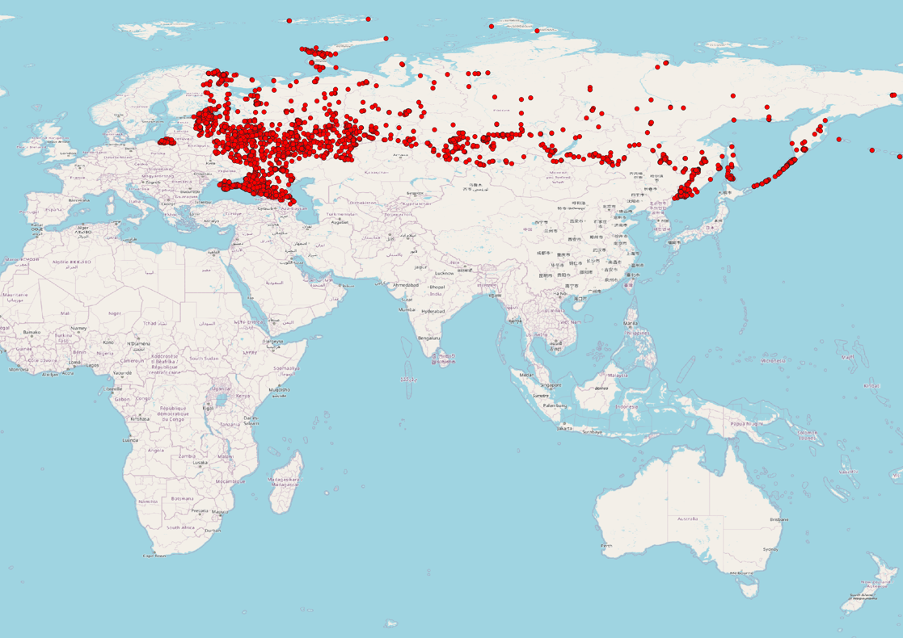
<p>Executing the provided SQL script will allow us to create a
<strong>military_geometries</strong> table that will contain polygons for 9,252
military objects identified on OSM:</p>

<p><img src="/imgs/geoanalytics-postgresql/image1.png" alt="" />
<em>Visualization of 9,252 military sites across russia and the temporarily
occupied Autonomous Republic of Crimea using QGIS</em></p>
<p>In OSM, as in other open sources, information is subject to change. For
example, from the beginning of 2022, 2,995 military objects in russia
were deleted.</p>

<p>They say, "Screenshots don't burn", but such deletions often lead to
the <a href="https://en.wikipedia.org/wiki/Streisand_effect">Streisand effect</a>,
where attempts to hide information only attract more attention. If you
want to delve into the historical data of OSM and help identify such
anomalies, you can use resources like
<a href="https://download.geofabrik.de/russia.html">GeoFabrik.de</a>. Although this
doesn't directly relate to our analysis, I want to show how these
deleted objects look on a map, illustrating russian attempts to conceal
essential data.</p>

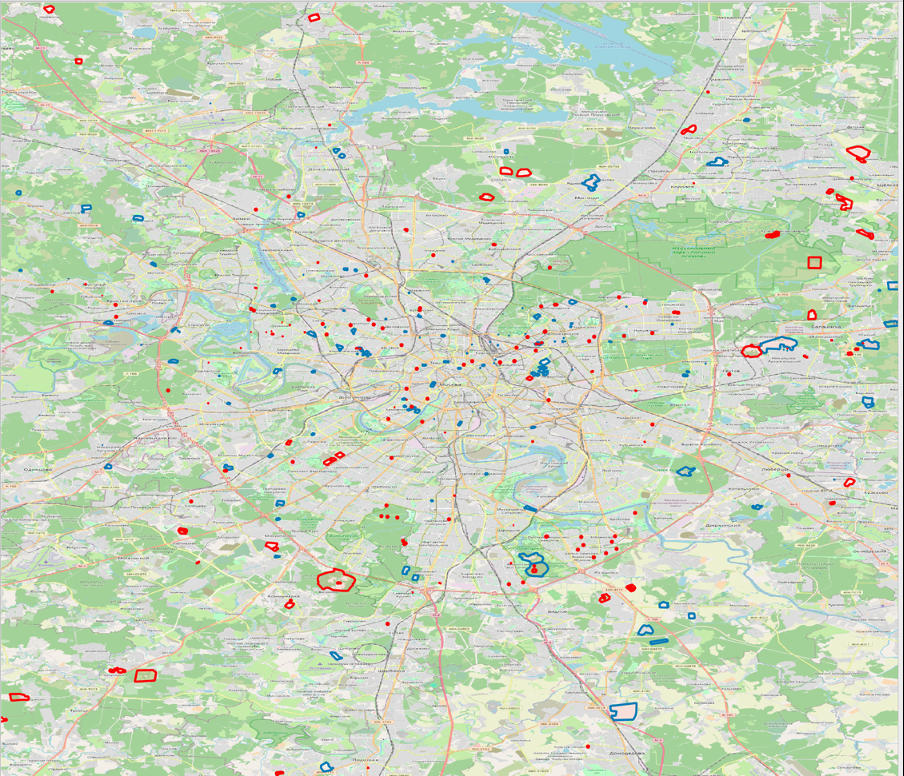
<p><img src="/imgs/geoanalytics-postgresql/image2.jpeg" alt="" />
<em>Deleted after 01/01/2022 (blue) and existing (red) geographical polygons
of military facilities in moscow</em></p>
<h2 id="second-data-source-fire-data-from-nasa-satellites">Second data source: fire data from NASA satellites</h2>

<p>As the next data source, we will utilize information from the <a href="https://www.earthdata.nasa.gov/learn/find-data/near-real-time/firms/vj114imgtdlnrt">Fire
Information for Resource Management
System</a>
(FIRMS) developed at the University of Maryland with support from NASA
and the UN in 2007. FIRMS allows real-time monitoring of active fires
worldwide, utilizing data from Aqua and Terra satellites equipped with
MODIS spectroradiometers and VIIRS on S-NPP and NOAA 20 satellites. The
information is updated every three hours and even more frequently for
the United States and Canada.</p>

<p>We will be using FIRMS data to identify fires within the territory of
russian military facilities since 2022.</p>

<p>To download fire data from the FIRMS system, we will employ the
following script, extracting all records of fires in russia from January
1, 2022, to the current date. These data will then be imported into a
new table, <strong>viirs_fire_events</strong>, in the PostgreSQL database.</p>

<script src="https://gist.github.com/kloba/8c64099f4286fd3275b7a9604e5b9128.js"></script>

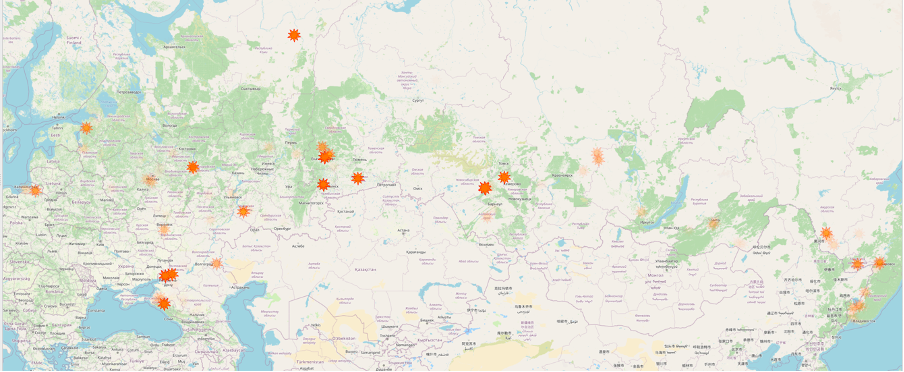
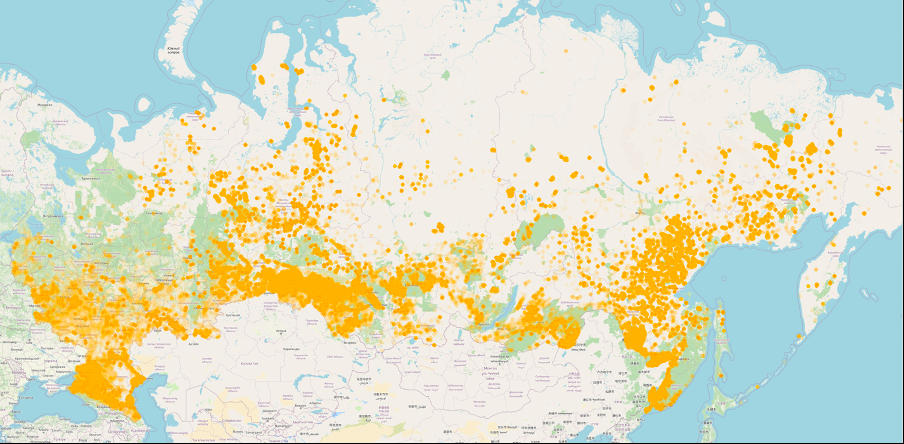
<p>Therefore, we will populate the <strong>viirs_fire_events</strong> table, which will
contain 1,711,475 records of fires in russia. These fires appear as
follows:</p>

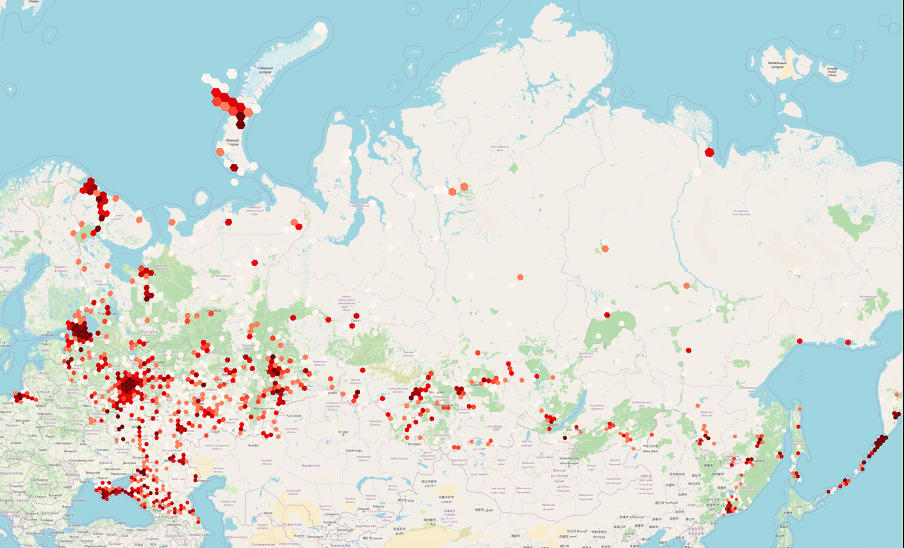
<p><img src="/imgs/geoanalytics-postgresql/image3.jpeg" alt="" />
<em>Visualization of fires in russia since January 1, 2022 (1,711,475 fires)</em></p>
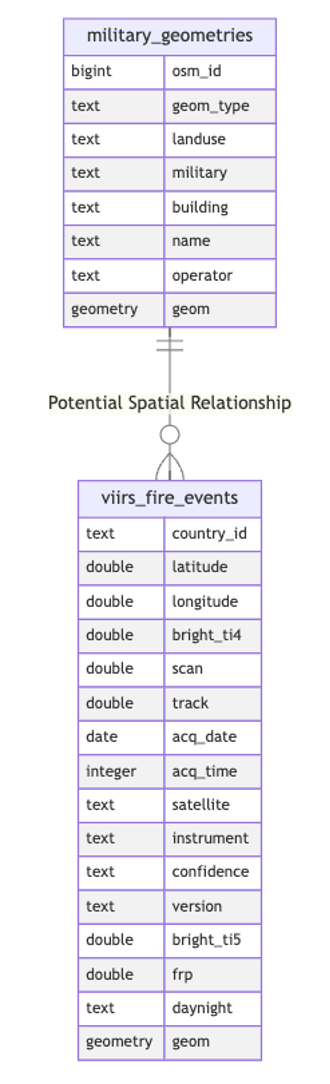
<p>The <strong>viirs_fire_events</strong> table in the PostgreSQL database will be used
to store detailed fire data, with fields for coordinates, satellite
parameters, date and time of acquisition, and other critical metadata. A
new column with a data type of <strong>GEOMETRY(POINT, 4326)</strong> will be
automatically populated based on the data from the <strong>longitude</strong> and
<strong>latitude</strong> columns.</p>

<script src="https://gist.github.com/kloba/14a295808b1173044ef2ace4465fb5f4.js"></script>

<p>Suppose you are interested in working with this data on military objects
and fires, but the described process of extracting datasets seems
time-consuming. In that case, there are exported CSV tables for you. You
can download them via the following links:
<a href="https://storage.googleapis.com/files.sql.ua/csv/military_geometries.csv">military_geometries</a>,
<a href="https://storage.googleapis.com/files.sql.ua/csv/viirs_fire_events.csv">viirs_fire_events</a>.</p>

<h2 id="searching-for-military-facilities-where-fires-occurred-points-within-the-polygon">Searching for military facilities where fires occurred: points within the polygon</h2>

<p>As for now, we have two tables: <strong>military_geometries</strong> and
<strong>viirs_fire_events</strong>. Let's try to find those military facilities that
have had fires (since the beginning of 2022) or those that have not yet
🙂.</p>

<p><img src="/imgs/geoanalytics-postgresql/image4.png" alt="" /></p>

<p>Let's use an SQL query with the
<a href="https://postgis.net/docs/ST_Contains.html"><strong>ST_Contains</strong></a> function to
identify military objects where fires have been detected from NASA
satellites.</p>

<script src="https://gist.github.com/kloba/49609e30b2b736c4d758c26c11fea068.js"></script>

<p>As you've probably noticed, we've identified 129 military sites that
have experienced fires since the start of 2022. What's intriguing is
that, in some cases, these fires seem to have occurred more than once.</p>

<p><img src="/imgs/geoanalytics-postgresql/image5.png" alt="" />
<em>Military facilities where fires have occurred since the beginning of
2022 (the transparency of the facilities indicates the frequency of the
fire incidents)</em></p>
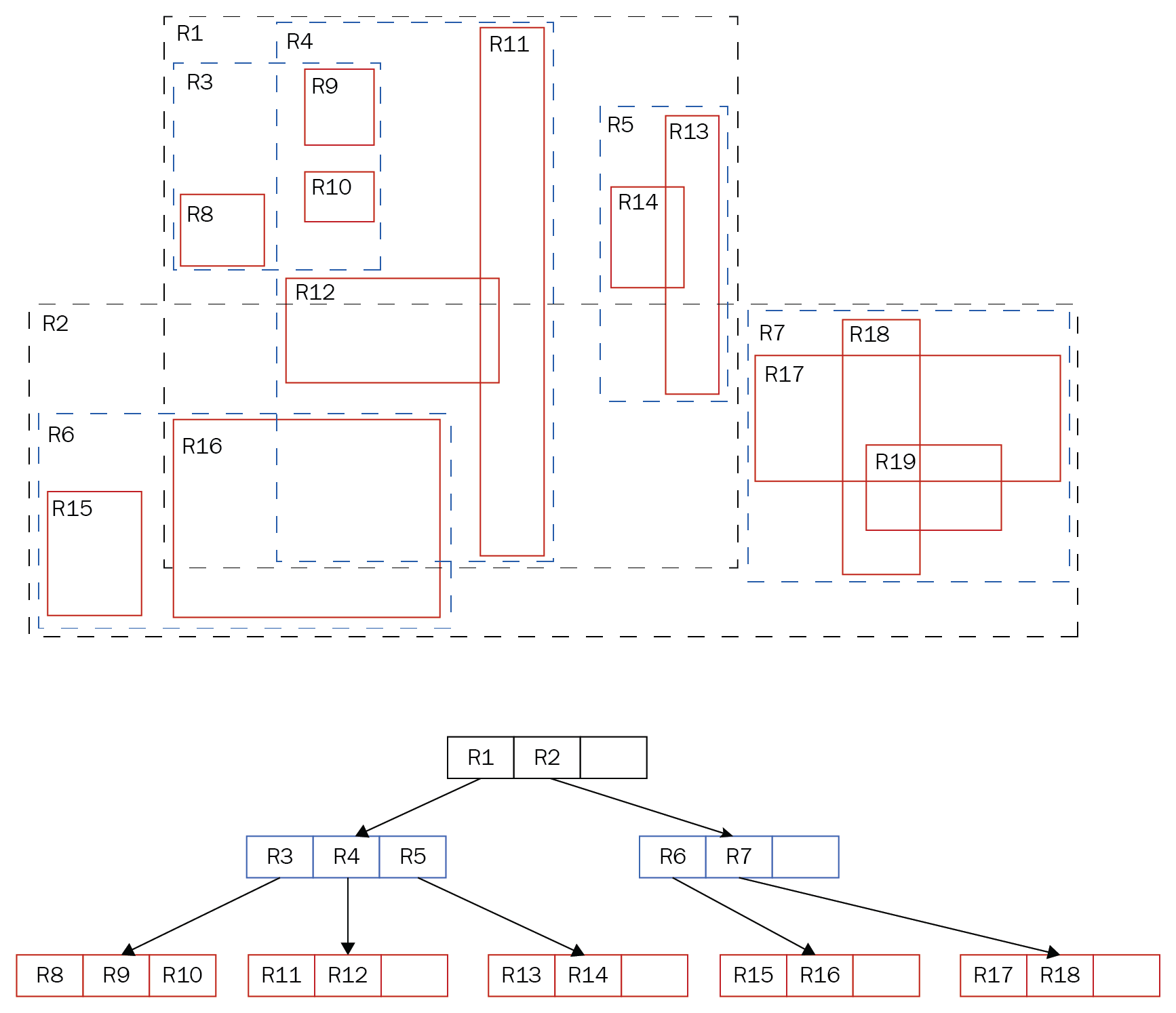
<p>The second aspect you may have noticed is that the specified query took
54 minutes and 15 seconds to execute, which is quite long for such a
straightforward operation. It's helpful to use the <a href="https://www.postgresql.org/docs/current/sql-explain.html">EXPLAIN
ANALYZE</a>
command to understand the reasons for this duration. This command allows
you to analyze the query execution process, identify potential
bottlenecks, and further optimize the query to improve performance.</p>

<script src="https://gist.github.com/kloba/5865856dae4e0995bcf00967394d2d50.js"></script>

<p>In this case, when using the <strong>Nested Loop Semi Join</strong> operator, we
encountered a complexity of O(n*m), where n is 9,252 rows in the
<strong>military_geometries</strong> table, and m is 1,711,475 rows in
<strong>viirs_fire_events</strong>. This implies that each row from the first table
is compared with every row from the second table, resulting in a huge
number of operations.</p>

<p>Hence, let's discuss how we can speed up the execution of such a query
by utilizing indexes.</p>

<h2 id="productivity-boost-utilizing-indexing-in-geoanalytics">Productivity boost: utilizing indexing in geoanalytics</h2>

<p>PostgreSQL is renowned for its scalability features, offering numerous
methods for accessing geospatial data within this database. To find all
methods suitable for working with points in a two-dimensional space, we
can execute the following query:</p>

<script src="https://gist.github.com/kloba/fc87c4192c371f543a811691c6ea921c.js"></script>

<p>As a result, we will observe at least five access methods, including
btree, hash, gist, brin, and spgist. I suggest investigating by creating
indexes for each of these methods and operator classes. After creating
the indexes, we will assess the query performance regarding fires at
military facilities in russia to determine which methods are most
effective for our task.</p>

<table>
  <thead>
    <tr>
      <th>Index type</th>
      <th>Index operator class</th>
      <th>Filtering operator</th>
      <th>Index creation time</th>
      <th>Index size</th>
      <th>Query execution time</th>
      <th>Brief explanation</th>
    </tr>
  </thead>
  <tbody>
    <tr>
      <td>btree</td>
      <td>btree_geometry_ops</td>
      <td>There is no corresponding operator—the index is disregarded for this query.</td>
      <td>1 sec 918 ms</td>
      <td>81 MB</td>
      <td>53 min 45 sec (129 rows affected)</td>
      <td>Supports equality and range queries; retrieves data quickly and in an organized manner.</td>
    </tr>
    <tr>
      <td>hash</td>
      <td>hash_geometry_ops</td>
      <td>There is no corresponding operator—the index is disregarded for this query.</td>
      <td>3 secs 158 ms</td>
      <td>59 MB</td>
      <td>53 min 15 sec (129 rows affected)</td>
      <td>Fast equality search; not suitable for ordering or range queries.</td>
    </tr>
    <tr>
      <td>brin</td>
      <td>brin_geometry_inclusion_ops_2d</td>
      <td>@(geometry,geometry)</td>
      <td>536 ms</td>
      <td>0.032 MB</td>
      <td>28 min 3 sec (129 rows affected)</td>
      <td>Effective for large datasets with naturally ordered data; indexes block ranges rather than individual rows.</td>
    </tr>
    <tr>
      <td>gist</td>
      <td>gist_geometry_ops_2d</td>
      <td>@(geometry,geometry)</td>
      <td>11 secs 659 ms</td>
      <td>94 MB</td>
      <td>493 ms (129 rows affected)</td>
      <td>Supports a wide range of queries, including spatial searches for overlap and proximity.</td>
    </tr>
    <tr>
      <td>spgist</td>
      <td>spgist_geometry_ops_2d</td>
      <td>@(geometry,geometry)</td>
      <td>6 secs 290 ms</td>
      <td>78 MB</td>
      <td>353 ms (129 rows affected)</td>
      <td>Suitable for data with uneven distribution; supports a variety of split tree structures.</td>
    </tr>
    <tr>
      <td>gist</td>
      <td>point_ops</td>
      <td>&lt;@(point,polygon)</td>
      <td>1 secs 426 ms</td>
      <td>81 MB</td>
      <td>306 ms (returned 132 records)</td>
      <td>Perfect for point data; supports queries on spatial relationships, such as containment and intersection.</td>
    </tr>
    <tr>
      <td>spgist</td>
      <td>quad_point_ops</td>
      <td>&lt;@(point,box)</td>
      <td>4 secs 849 ms</td>
      <td>77 MB</td>
      <td>243 ms (173 rows affected)</td>
      <td>Utilizes quadtrees to index point data; effective in specific scenarios of spatial analysis.</td>
    </tr>
    <tr>
      <td>spgist</td>
      <td>kd_point_ops</td>
      <td>&lt;@(point,box)</td>
      <td>5 secs 204 ms</td>
      <td>93 MB</td>
      <td>199 ms (173 rows affected)</td>
      <td>Employs kd-trees for multidimensional point data; excellent for finding nearest neighbors.</td>
    </tr>
  </tbody>
</table>

<p><em>Note: The operator classes mentioned do not utilize geometry data types for searching; they work with &lt;@(point, polygon) and &lt;@(point, box). As a result, the row counts may not match the output (for example, a complex geographic polygon may have been simplified to a rectangle).</em></p>

<p>The results table shows that the most effective indexes for our task are
<a href="https://www.postgresql.org/docs/current/gist.html">GiST</a> and
<a href="https://www.postgresql.org/docs/current/spgist.html">SP-GiST</a>. Let's
delve into how they operate.</p>

<h2 id="how-gist-works">How GiST works</h2>

<p>Generalized Search Tree (GiST) indexes in PostgreSQL enable efficient
sorting and searching across diverse data types using the concept of
balanced trees. They provide the ability to develop custom operators for
indexing, making GiST quite versatile and adaptive to specific
requirements.</p>

<p><img src="/imgs/geoanalytics-postgresql/image6.png" alt="" />
<em>The hierarchical structure of the GiST index in PostgreSQL [1]</em></p>
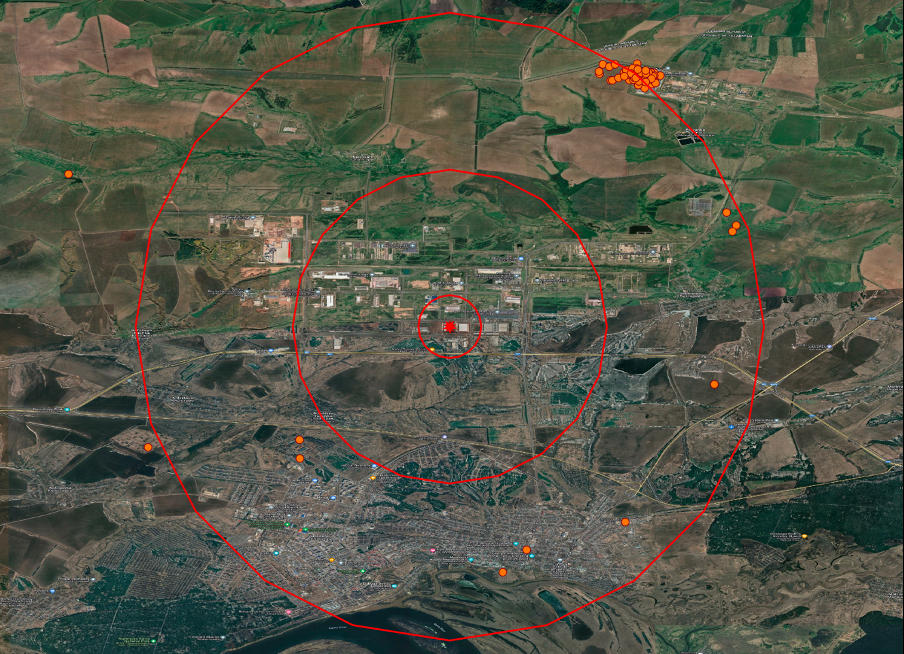
<p>In the example of a GiST tree depicted: at the top level, there are
<strong>R1</strong> and <strong>R2</strong>, serving as bounding boxes for other elements. <strong>R1</strong>
contains <strong>R3</strong>, <strong>R4</strong>, and <strong>R5</strong>, while <strong>R3</strong>, in turn, encompasses
<strong>R8</strong>, <strong>R9</strong>, and <strong>R10</strong>. The GiST index has a hierarchical
structure, allowing for significantly faster search. Unlike B-trees,
GiST supports overlap operations and spatial relationship determination.
This is why GiST is well-suited for indexing geometric data.</p>

<h2 id="how-sp-gist-works">How SP-GiST works</h2>

<p>Space Partitioning Generalized Search Tree (SP-GiST) indexes in
PostgreSQL are designed for data structures that partition space into
non-overlapping regions, such as quadrant trees or prefix trees. They
enable the recursive division of data into subsets, forming unbalanced
trees. This makes SP-GiST indexes particularly effective for in-memory
usage, where they can quickly process queries due to fewer levels and
small data groups in each node.</p>

<p>However, SP-GiST indexes have disadvantages when stored on disk due to
the high number of disk operations required for their functioning,
especially in large databases.</p>

<p>Considering this, GiST indexes often become a better choice, especially
when working with polygons and complex spatial structures.</p>

<h2 id="finding-the-nearest-neighbors-10-fires-near-the-shahed-production-plant">Finding the nearest neighbors: 10 fires near the Shahed production plant</h2>

<p>Now, let's attempt to solve the task of finding nearest neighbors using
PostgreSQL. Using our datasets, we will try to identify ten fires that
occurred near the factory in russia, where Iranian Shahed drones are
manufactured. For more detailed information about the plant, you can
refer to the <a href="https://molfar.com/blog/alabuga-deanon">research</a>
conducted by the Molfar team. The factory is located in the special
economic zone
<a href="https://en.wikipedia.org/wiki/Alabuga_Special_Economic_Zone">Alabuga</a>
in Tatarstan, where previously cat food and automotive glass were
produced, and mushrooms were grown. However, after sanctions against
Russia, its priorities shifted, and now it plays a key role in russia's
plans for drone production.</p>

<p>One of the methods to solve this task is to create a buffer in the form
of a circle around the selected target. This buffer is recursively
expanded until the required number of results is obtained. In
PostgreSQL, this can be implemented with the following SQL query, which
forms the buffer and identifies fires that occurred within the specified
radius from the selected object:</p>

<script src="https://gist.github.com/kloba/44b4f72ebbf45f8e3babd82ef2f04e14.js"></script>

<p>This approach involves gradually expanding the buffer and analyzing the
results, which can be time-consuming.</p>

<p><img src="/imgs/geoanalytics-postgresql/image7.png" alt="" />
<em>A plant in Tatarstan that produces Shaheds with fire visualization
within radii of 1.5 and 10 km</em></p>
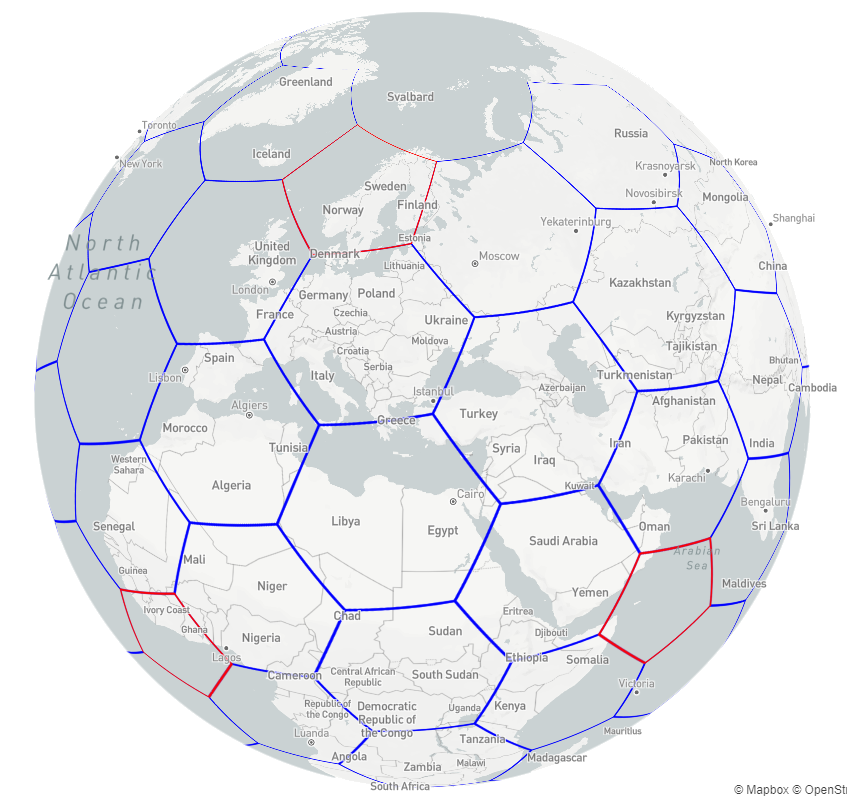
<p>Various operators supported by GiST indexes can be utilized to optimize
geospatial queries. To retrieve a list of available operators to use
with a GiST index, you can execute an SQL query that scans the
PostgreSQL system tables and provides information about operators
associated with the <strong>gist_geometry_ops_2d</strong> operator class. This will
help identify the most efficient operators for performing specific
geospatial operations in the database.</p>

<script src="https://gist.github.com/kloba/99d7f600c728f184d412d77ce8028fb4.js"></script>

<p>Our GiST index provides extensive capabilities for working with geodata,
allowing you to determine the spatial location of objects and measure
distances. The <strong>&lt;-&gt;</strong> operator enables sorting objects by proximity
to a specified point. In this example, we use this operator to identify
the ten closest fires to the specified location.</p>

<script src="https://gist.github.com/kloba/b3ac9dab240ca834cf20b61016f0da3e.js"></script>

<p>The query turned out to be significantly faster—15 times swifter,
compared to the previous methodology, and this is without repeated
executions with a changed radius. We can analyze the query plan to
confirm that the speed increased due to the use of an index and an
operator. This way, we'll ensure that the index was indeed involved,
which is the key to improving productivity.</p>

<script src="https://gist.github.com/kloba/f6be940d206e4a453ce58f572f0559f3.js"></script>

<p>As we can see, indexes, similar to GiST, extend analytical capabilities
beyond simple comparisons, enabling the resolution of more complex
tasks. As demonstrated in this article, open data can be effectively
utilized for quickly assessing and defining goals on a global scale,
including evaluating the success of target impact.</p>

<h2 id="ubers-h3-a-perspective-on-geospatial-analytics-and-data-aggregation">Uber's H3: a perspective on geospatial analytics and data aggregation</h2>

<p>The H3, developed by Uber, is a hexagonal grid system designed to
facilitate flexible and efficient distribution of geospatial data. It
seems that H3 has the potential to become a common standard for working
with geodata in the Armed Forces of Ukraine. Let's explore how this
tool can be used for data aggregation and solving complex geoanalytical
tasks.</p>

<p><img src="/imgs/geoanalytics-postgresql/image8.png" alt="" />
<em>Illustration of the Uber H3 hexagonal grid</em></p>
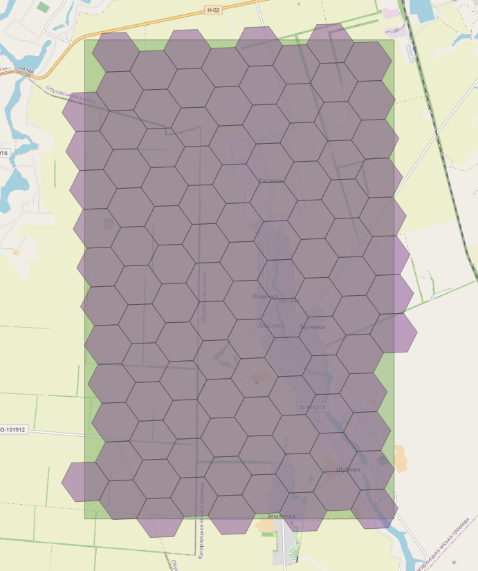
<p>As you can see in the image, each hexagon serves as a distinct
geographic unit, simplifying the processing of intricate geoforms into
uniform segments.</p>

<table>
  <thead>
    <tr>
      <th>Level</th>
      <th>Total number of objects</th>
      <th>Number of hexagons</th>
      <th>Number of pentagons</th>
    </tr>
  </thead>
  <tbody>
    <tr>
      <td>0</td>
      <td>122</td>
      <td>110</td>
      <td>12</td>
    </tr>
    <tr>
      <td>1</td>
      <td>842</td>
      <td>830</td>
      <td>12</td>
    </tr>
    <tr>
      <td>2</td>
      <td>5,882</td>
      <td>5,870</td>
      <td>12</td>
    </tr>
    <tr>
      <td>3</td>
      <td>41,162</td>
      <td>41,150</td>
      <td>12</td>
    </tr>
    <tr>
      <td>4</td>
      <td>288,122</td>
      <td>288,110</td>
      <td>12</td>
    </tr>
    <tr>
      <td>5</td>
      <td>2,016,842</td>
      <td>2,016,830</td>
      <td>12</td>
    </tr>
    <tr>
      <td>6</td>
      <td>14,117,882</td>
      <td>14,117,870</td>
      <td>12</td>
    </tr>
    <tr>
      <td>7</td>
      <td>98,825,162</td>
      <td>98,825,150</td>
      <td>12</td>
    </tr>
    <tr>
      <td>8</td>
      <td>691,776,122</td>
      <td>691,776,110</td>
      <td>12</td>
    </tr>
    <tr>
      <td>9</td>
      <td>4,842,432,842</td>
      <td>4,842,432,830</td>
      <td>12</td>
    </tr>
    <tr>
      <td>10</td>
      <td>33,897,029,882</td>
      <td>33,897,029,870</td>
      <td>12</td>
    </tr>
    <tr>
      <td>11</td>
      <td>237,279,209,162</td>
      <td>237,279,209,150</td>
      <td>12</td>
    </tr>
    <tr>
      <td>12</td>
      <td>1,660,954,464,122</td>
      <td>1,660,954,464,110</td>
      <td>12</td>
    </tr>
    <tr>
      <td>13</td>
      <td>11,626,681,248,842</td>
      <td>11,626,681,248,830</td>
      <td>12</td>
    </tr>
    <tr>
      <td>14</td>
      <td>81,386,768,741,882</td>
      <td>81,386,768,741,870</td>
      <td>12</td>
    </tr>
    <tr>
      <td>15</td>
      <td>569,707,381,193,162</td>
      <td>569,707,381,193,150</td>
      <td>12</td>
    </tr>
  </tbody>
</table>

<p>This is a hierarchical system consisting of 15 levels dividing the
Earth's surface into hexagons. The zero level is divided into 122
sections, 12 of which are pentagons for accurately representing the
Earth's spherical shape. We have approximately 569 trillion hexagons at
the finest level, each representing a distinct geospatial object. The
video below demonstrates how this works in practice.
<a href="https://youtu.be/RbeYPqsFGPI">https://youtu.be/RbeYPqsFGPI</a></p>

<p>PostgreSQL can integrate H3 functionality through an additional
extension. To install this extension, use the <strong>CREATE EXTENSION h3;</strong>
command, and it is available on cloud computing services, including AWS
RDS (my acknowledgments to AWS for their support of Ukraine). Once
you've installed this extension, new functions become accessible.
Let's explore those functions that might be useful for beginners:</p>

<table>
  <thead>
    <tr>
      <th>Function</th>
      <th>Input data</th>
      <th>Output data</th>
      <th>Description</th>
    </tr>
  </thead>
  <tbody>
    <tr>
      <td>h3_lat_lng_to_cell</td>
      <td>latitude: FLOAT, longitude: FLOAT, resolution: INT</td>
      <td>H3 index: BIGINT</td>
      <td>Converts latitude and longitude coordinates into an H3 index at a specified resolution level.</td>
    </tr>
    <tr>
      <td>h3_cell_to_boundary</td>
      <td>H3 index: BIGINT</td>
      <td>Array of boundary coordinates: GEOMETRY(POLYGON, 4326)</td>
      <td>Transforms an H3 index into a geometric polygon representing the boundaries of a hexagon.</td>
    </tr>
    <tr>
      <td>h3_get_resolution</td>
      <td>H3 index: BIGINT</td>
      <td>Resolution level: INT</td>
      <td>Returns the resolution level of a given H3 index.</td>
    </tr>
    <tr>
      <td>h3_cell_to_parent</td>
      <td>H3 index: BIGINT, desired resolution: INT</td>
      <td>Parent H3 index: BIGINT</td>
      <td>Converts an H3 index into its parent index at a higher hierarchy level.</td>
    </tr>
    <tr>
      <td>h3_cell_to_children</td>
      <td>H3 index: BIGINT, desired resolution: INT</td>
      <td>Array of child H3 indexes: SETOF BIGINT</td>
      <td>Converts an H3 index into an array of child indices at a lower hierarchy level.</td>
    </tr>
    <tr>
      <td>h3_polygon_to_cells</td>
      <td>geometry: GEOMETRY, resolution: INT</td>
      <td>Array of H3 indexes: SETOF BIGINT</td>
      <td>Transforms a polygon into a set of H3 indices that fully or partially cover the polygon.</td>
    </tr>
    <tr>
      <td>h3_grid_disk</td>
      <td>H3 index: BIGINT, range: INT</td>
      <td>Array of H3 indexes: SETOF BIGINT</td>
      <td>Generates an array of H3 indices representing a hexagonal grid around the central H3 index, forming a “disk” of a defined radius.</td>
    </tr>
    <tr>
      <td>h3_compact_cells</td>
      <td>Array of H3 indexes: SETOF BIGINT</td>
      <td>Array of compact H3 indexes: SETOF BIGINT</td>
      <td>Consolidates an array of H3 indices, reducing the number of indices covering the same area.</td>
    </tr>
  </tbody>
</table>

<p>To address the first task effectively, we can transform all our polygons
into arrays of H3 indexes (hexagons) of a specified level. Similarly, we
can process the centroids of fires by converting them into H3 indexes.
By obtaining BIGINT data types for these H3 indexes, we can apply a
standard B-tree index, which is particularly efficient in performing
equality comparison operations. This will significantly improve query
execution speed in complex geoanalysis tasks, ensuring fast and accurate
results.</p>

<p>Let's examine a few simple H3 functions that will help better
understand how this works in practice:</p>

<table>
  <thead>
    <tr>
      <th><img src="/imgs/geoanalytics-postgresql/image9.png" alt="Image 1" /></th>
      <th><img src="/imgs/geoanalytics-postgresql/image10.png" alt="Image 2" /></th>
      <th><img src="/imgs/geoanalytics-postgresql/image11.png" alt="Image 3" /></th>
    </tr>
  </thead>
  <tbody>
    <tr>
      <td><strong>h3_polygon_to_cells(geom, 8)</strong><br />This function converts the geometry of a military polygon into a set of H3 indexes at the eighth level of resolution, effectively dividing the polygon into hexagons, each covering an area of 0.737327598 square kilometers, enabling detailed spatial analysis.</td>
      <td><strong>h3_grid_disk(h3_polygon_to_cells(geom, 8), 1)</strong><br />If certain areas of the polygon remain uncovered after applying h3_polygon_to_cells, you can use h3_grid_disk to create an additional ring of H3 indexes. It will expand coverage by adding hexagons around existing indexes, ensuring complete coverage of the defined geographic polygon.</td>
      <td><strong>h3_polygon_to_cells(geom, 9)</strong><br />Using the <strong>h3_polygon_to_cells</strong> function with a level 9 increases the grid’s resolution to a finer scale, where each hexagon represents an area of 0.105332513 square kilometers. This allows for greater accuracy in reproducing the geometry of the geographic polygon for detailed spatial analysis. However, it also results in more hexagons, which may negatively impact query execution speed.</td>
    </tr>
  </tbody>
</table>

<p>During my presentation at PGConf.2023, the largest conference in Europe
dedicated to PostgreSQL, I had the opportunity to showcase a series of
more complex challenges that can be addressed by aggregating geospatial
data using H3. One example involved the search for other drones located
in the exact location and time, as well as the analysis of routes taken
by drones traveling together, identified in different places over a
specific period (Companion Analysis). You will have the opportunity to
learn more about this topic in the continuation of this article.</p>

<p>Within our datasets, we can analyze military objects and, through
aggregation with H3, calculate the density of these objects in russia.
The visualization of this analysis looks like this:</p>

<p><img src="/imgs/geoanalytics-postgresql/image12.png" alt="" />
<em>Visualization of the density of military objects in russia and the
temporarily occupied Autonomous Republic of Crimea using H3 hexagons</em></p>

<p>Using H3 for aggregating geospatial data significantly enhances
analytical capabilities, allowing for a more profound interpretation and
visualization of complex spatial relationships.</p>

<h2 id="concluding-remarks">Concluding remarks</h2>

<p>If you are a representative of the Armed Forces of Ukraine and are
seeking qualified support in the field of data, Big Data, or
geoanalytics, feel free to reach out to me. My team of volunteers and I
will gladly assist you with our knowledge and resources.</p>

<p>Additional resources I utilized in preparing this article:</p>

<ul>
  <li><a href="https://subscription.packtpub.com/book/data/9781800567498/3/ch03lvl1sec19/understanding-postgresql-index-types">Mastering PostgreSQL by Hans-Jürgen
Schönig</a></li>
  <li><a href="https://www.washingtonpost.com/investigations/2023/08/17/russia-iran-drone-shahed-alabuga/">Inside the russian effort to build 6,000 attack drones with Iran’s
help</a></li>
  <li><a href="https://h3geo.org/docs/core-library/restable/">Uber H3. Tables of Cell Statistics Across
Resolutions</a></li>
  <li><a href="https://github.com/zachasme/h3-pg/blob/main/docs/api.md">H3-PG Extension. API
Reference</a></li>
  <li><a href="https://postgis.net/documentation/">PostGIS documentation</a></li>
  <li><a href="https://www.amazon.com/PostGIS-Action-Third-Leo-Hsu/dp/1617296694">PostGIS in Action, Third Edition by Leo S. Hsu and Regina
Obe</a></li>
</ul>

<p>While preparing this article, I used an Ubuntu server with the following
characteristics and configured the PostgreSQL database as follows:</p>

<script src="https://gist.github.com/kloba/7670de1d6dc91f337b89897a6829ea88.js"></script>

]]></content>
    <author>
      <name>Taras Kloba</name>
    </author>
    
    <category term="PostgreSQL"/>
    
    <category term="GeoAnalytics"/>
    
    <category term="Data Engineering"/>
    
    <summary type="html"><![CDATA[Geoanalytics is crucial in military affairs, as a significant portion of
military data contains geoattributes. In this article, I will discuss
how to use PostgreSQL to process geospatial data and address common
geoanalytical tasks. The information will cover methods for finding the
nearest object...]]></summary>
  </entry>
  
</feed>